Started swimming

Due to my squash partner twisting his ankle while pissed, I was looking round for a cheap interesting exercise this morning, turns out the Local pool is 5 Min’s walk away from me and costs £3 with my “Iz card” WHY haven’t I used it before now????

Its open at 6.30 for lanes, done my first 500M (starting slowly)

Only 6,649.5Km left till I’ve swam the length of the Nile :p

Old Comments

Mark Barton(28/05/2012 13:15:56 GDT)

Won’t all of the wookie fur block up the filters? Emoticon

New Anime Series- Folktales from japan

First Episode Review for: Folktales from japan

Summary : As you may have guessed from the title this anime is a series of retellings of traditional Japanese folk tales.

Animation : Very basic, a certain simplistic charm but obviously designed for young children

Plot Potential: 3 short tales for each episode very much in the vein of Aesop’s fables, although Japan REALLY has it in for bad neighbours, really REALLY!!

Characters: I cant really pass judgements on traditional characters that are there to relate the point of a tale rather than entertain us, characters tend to be very polar either completely good or completely bad

Music: Snippets of traditional music and a couple of kiddies tunes for closing, nothing that gets on the nerves.

Reminds me of: Nope this is fairly unique on me, i vaguely remember an 80’s anime about history that might come close but I can find its name

Overall: These were really quite fun to watch, quite fascinating in fact and I suspect gave a bit of low brow cultural background to the normal stuff I watch, very much recommend.

Disclaimer: These are mini reviews of anime’s that are fresh out in Japan and are not licensed in the UK, buy them once they have been licensed or at the very least buy the merchandise, remember if the anime makers make a loss, THEY WILL STOP MAKING ANIME!!

Review of Vx Shop

Since becoming a vegetarian and more recently a vegan I have probably eaten in a more healthy fashion than at any time in the last 20 years. When you’re a vegan you can obviously make good food for yourself at home any time, and there are lots of good veggie health food places to shop or eat in London, but sometimes you just want a hot dog or a mouthful of biscuits or generally some junk food.

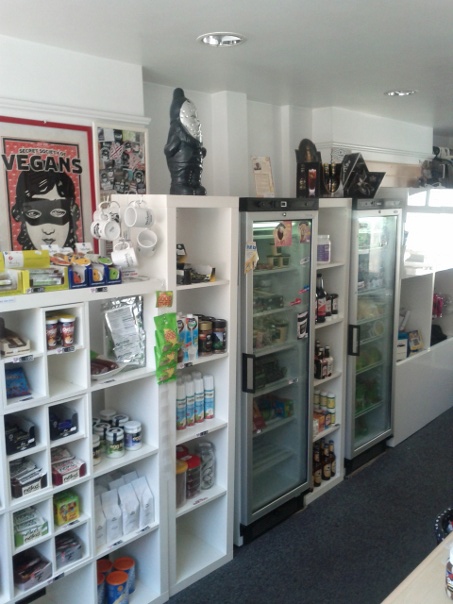
Thankfully there is a place in London that fills that need, its Vx or SSOV (Secret Society of Vegans): It’s a shop that occupies the “oh F**K isn’t there a proper vegan version of that” area of the market. I go there every weekend to get both the interesting core of my week’s food as well as the treats that you simply can’t get elsewhere. I’m talking about vegan marshmallows, doner kebab meat, cheesecake and proper vegan cheese that actually bloody melts for amazing pizza, all the stuff you can’t seem to find in the more specialist food shops. While a number of vegan products like cheese and ‘meats’ can be found in other grocery shops around London, Vx seems to stock the best tried and tested versions out there, which makes sense seeing as the owner is vegan himself.

In addition to that, the shop provides shoes, clothes, pet food, cakes and pasties, with more of an urban feel than a hippy one. It’s owner is both very open-minded to new products and suggestions and very very careful that all the products he sells are truly vegan, which makes shopping there a blessed relief in this day and age when product ingredients are sometimes not listed clearly and sometimes they seem to change each week depending on third line suppliers.

The shop is quite small physically but don’t let that stop you going each week, as it’s crammed with a large variety of things and the stock changes rapidly as new products come out from the various suppliers so there is always something new to try (that’s my excuse for going to get one of the ace hot dogs and I’m sticking to it!!!)

There is also a webshop and they update their Twitter and Facebook meticulously, both with things such as opening hours, as well as new stock or cupcake flavour of the day etc.

One final thing, the shop is located only 4 mins walk from Kings Cross so if you are waiting for a train you can actually get something nice to each for a change!!


Old Comments

hm(25/07/2012 09:45:46 GDT)

AWESOME!!

New Anime Series- Jewel Pet Deco

First Episode Review for: Jewel Pet Deco

Summary : The Jewel Pets are back for their 4th go, this time they seem to be saving the world with the help of a teenage super team

Animation : Bright single tone cell animation, but they have gone overboard with the sparkly effects, but I can only guess that given the reception from the rest of the flat that this is a good thing

Plot Potential: WTF! This makes even less sense than the normal Jewel Pet series, no plot continuity from the other series, so just treat it as a fresh start and enjoy it.

Characters: Core characters remain the same but the look and history of everything else has been changed, however the amazing and hysterical scripts continue, I don’t know if its the original or a gifted set of translators but let it continue.

Music: bouncy bouncy (dance like a 8 year old)

Reminds me of: All the other JewelPet shows but most of all JewelPet Sunshine

Overall: The lowest of low stress anime, if you’re feeling down put this on in the background!

Disclaimer: These are mini reviews of anime that are fresh out in Japan and are not licensed in the UK, buy them once they have been licensed or at the very least buy the merchandise, remember if the anime makers make a loss, THEY WILL STOP MAKING ANIME!!

Drobo or NAS to amason s3 with rsync

I have written before about syncing desktop stuff to a NAS (in my case a Drobo) using Rsnc for backup reasons before, but lets now take it a step further and sync our Drobo/NAS stuff with amazon s3, in this example I will be backing up my precious happy hardcore and audio book collection that all live in a Directory called “Audio” on one of my Drobo shares

1) First create a mount point for your Drobo/NAS connection, I created a folder called “/media/localAudio” (ensuring that the local user you will be backing up as has write rights to the folder)

2) Next ensure you have the samba file sharing utilities installed (smbfs), you can do this on a terminal prompt with

sudo apt-get install smbfs

3) See if you can now mount your share with “sudo mount -t smbfs //192.168.0.XXX/myshare/Audio/ -o username=stickfight,password=password”
This assumes that I am want to map the “Audio” directoy on the “myshare” share on the IP address 192.168.0.XXX, also that you have to log-on to your share to be able to read/write to it, if you don’t, just miss out the “-o username=stickfight,password=password” bit

4) Now letts connect to amazon S3, you will first need an amazon 3s bucket for this (or use an existing one), go here for instuctions on creating one, mine is called “stickfight-audio”

5) This bit is less easy, you need to install s3sf, you can get clear instructions from here

6) Right, s3sf uses FUSE to perform its connections, but we have to tell it where your security credeiatals are for your S3 bucket, so create a text file .passwd-s3fs in your home directory and put your security credentials in them in the following format bucketName:accessKeyId:secretAccessKey , e.g.

stickfight-audio:0VWEOIEWOIUREWOIUFDS2:t4SyQ6pGjldoi4898dsoierelke/auw2wB4Rs+

(no theses arn’t my bloody credentials)
and give it the following permissions

chmod 600 ~/.passwd-s3fs

7) Next we want a mount point for the s3 bucket on our system, I created a folder called “/media/s3Audio” (ensuring that the local user you will be backing up as has write rights to the folder)

8) Now we can mount our S3 bucket as a local drive with s3fs bucket_name /mount/point, e.g.

s3fs stickfight-audio /media/s3Audio

9) Next make sure you have Rsync installed with

apt-get install rsync

10) Finally you can run your Rsync command to do the backup e.g.

rsync -r -t -u --progress  /media/localAudio/ /media/s3Audio

NOTES:
“-r” = copies all the sub directories and file, normally you would use “-a” but that copies the file permissions as well which in this case I don’t want.
“-u” = Update, means it only copies only new or recently changed files.
“–progress” = makes the terminal output far more readable and tells you how far it gets now.
“/media/localAudio/ /media/s3Audio” = source and target directories.(the “/” at the end of localAudio stops it actually creating a localAudio folder in the root of your s3 bucket thus keeping your directory structures the same level)

Doing this will backup your data perfectly, but it will beat the hell out of your bandwidth, a program such as trickle can limit the damage, install it via

sudo apt-get install trickle

Then use it to alter your S3 mount point, so that it limits the upload speed (in this case to 512KB/s, but you can change it to what ever suits you)

trickle -u 512 s3fs stickfight-audio /media/s3Audio

If you get an error along the lines of “trickle: Could not reach trickled, working independently: No such file or directory” ignore it, its just a badly worded advisory

So thats it working, I’ve rolled all this up into a script file that I can run when it suits me (its too big for a schedule)

sudo mount -t smbfs //192.168.0.XXX/myshare/Audio/ -o username=stickfight,password=password
trickle -u 512 s3fs stickfight-audio /media/s3Audio
rsync -r -t -u --progress  /media/localAudio/ /media/s3Audio

There you go.