en_GB location, Eclipse and the flash builder plug in

If you are UK resident you may have discovered Flash builder 4’s nasty little habit of bleating about the missing en_GB location, the reason for this is, as a Brit you have quite rightly set your eclipse for that location, but somewhere in the second beta of Flash builder 4 Adobe decided the green and pleasant land was unworthy of its own location and stripped it out of the build, just renaming the en_US location directory does not work as a fix, you have to right click on your flex project –> select properties, and set the compiler options to “-locale en_US” as per below

Sigh!, i never thought being a English man would be considered a minority group

HTML5 and CSS3

Here is the results of another skillsmatters free talk, this one on HTML5 and CC3 and was presented by www.brucelawson.co.uk (@brucel )

Bruce was an excellent speaker and gave an amazing 101 session using only notepad++ which was nice (I have personally been accused recently of missing out the basics so its good to see how it should be done), you have all heard so much on this subject before, that I’m just going to bullet point the bits i took away from the session,

  • He was at some pains to point out what HTML5 was and what it was not (ie its not another way of saying Web 3.0 or “just not flash”),
  • He was definite on the point that HTML5 WILL NOT KILL FLASH, but it will provide people with a choice for a lot of functions that currently you can only do with flash.
  • There was a lot of emphasis on coping with screen readers and making content easier for computers to parse intelligently and how HTML5 is better for that.
  • Quite a lot of the tags have been redefined e.g. small = “small print in a contract” rather than “little in size”
  • Most of HTML5 is JavaScript (50%+ of the spec)
  • HTML5 does not care about quotes (its in the spec not just lazy)
  • HTML5 does not care about case (its in the spec not just lazy)
  • HTML5 ignores stuff it does know (like CSS)
  • It has things like sliders and calendar pickers built in (its things like this that makes people look at it as an alternative to flash)
  • Validation is build in (fairly crude but very like a jquery validator and he did say it would get better)
  • The video element is really rather good (you can tab in and out and make it easily grow and shrink etc. which is hard to do on flash), but the much published codex problems are quite real, you have to currently encode 2 versions of your video: ogv and mp4 (this was caused by apple and nokia), webm could hopefully put a end to the problem. for old browsers you can use the current embed elementOn CSS3
  • CSS3 is Amazing!!! (transform and transition and webfonts)
  • On CSS3 currently you have to put a “display:block” for ALL HTML5 elements you are using, as no browser currently supports them.
  • The CSS5 media functions are really cool but I’m not going to talk about them as Ben Poole has just used them in anger and I’m hoping a bit of peer pressure will force him to write a proper bloody blog entry.
  • Layered background are amazing (with good png transparency)
  • Arrrrh!! where was background size when i wanted it for my client recently!!Code Snippit
    to make IE8 and below apply CSS to HTML5 you have to add the following:
    document.createElement(‘xxxxx’); for each html5 tag you use, e.g.

    document.createElement(‘header’);
    document.createElement(‘nav’);

    and you have to include a “body” element some where on the page

    Links

    Recommended validator: html5.validator.nu
    To see how well you code parses running it by: http://www.nvda-project.org/
    The Best place for free webfonts: http://www.fontsquirrel.com/

Future Mouse Review

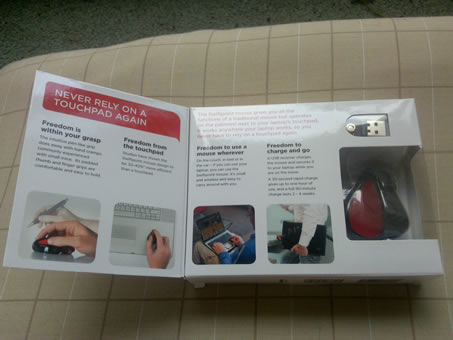
My future mouse arrived last week from http://www.futuremouse.com/, and has spent this week being used as a travel mouse on trains and a replacement mouse for my tracker ball at work, on all counts it has passed with flying colours, if you treat is as a pen it feels natural to use and needs no learning curve, i did discover a slight cramping in my hand after using it all day, mind you I get that with a normal pen. it possesses it own rechargeable battery and its tiny usb transmitter that doubles as a magnetic dock and charging point ( 30secs charge = 1 hour use, 90mins charge = 2-4 weeks use). One of the most gratefully received features is the complete lack of software to install, advanced features such as reorientation of ‘up’ and setting the “only work when being held” are set via button combinations and watching the LEDS, for a Linux user who constantly misses out on the advanced features for consumer level products this is very very welcome. the mouse manages to squeeze in a full size and silent scroll wheel which is joy to use, it also comes with a stick on mouse pad for the bottom of you laptop but which seems mainly designed for the Mac or other laptops whos touch pads are not depressed, so I’m not using that, in a real life test i found I could share a GNER train table with another laptop user with no problems despite the laptops being only inches away, but for a travel mouse (and an expensive one at that), its strange it does not come with a little sleeve or draw bag to be carried in, (i ended up using the one that is supplied for the tips on the power money explorer).

Pro’s
-Tiny (and i mean really tiny)
-Light (its hard to believe there is a 4 week rechargeable battery in there
-Excellent build quality
-Works in very small spaces
-Truly OS agnostic

Cons
-No travel pouch
-The transmitter/receiver does not clip securely into the mouse (yes you can attach it to the charge point but it always comes off when banged round in my bag)
-Expensive (but good values for money)

Conclusion
I am very pleased with the mouse, and it really does everything it says on the tin, and even if it does not replace my logitech trackman as my main pointer, it beats the hell out of the track pad, and turns “Oh F**K I have forgotten my mouse” to “Oh i have the spare mouse in my pack”.

Drobo FS review

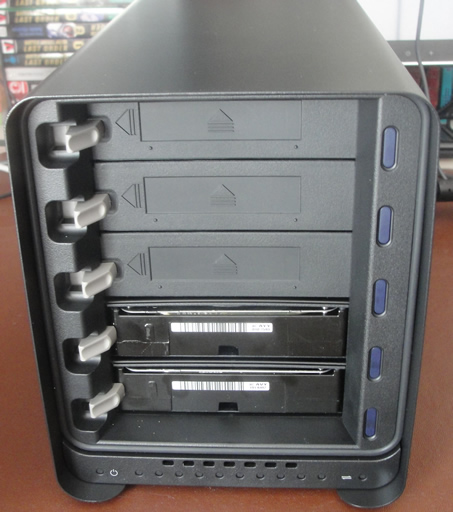
After a couple of month drooling, and feeble attempts to be good, I have taken the plunge and purchased a Drobo FS (in the uk, Amazon is the cheapest after you have taken into consideration Amazon prime membership and lack of hassle ), as a long time user of both 1st and 2nd gen drobos and drobo shares, I was hoping for great things from this all in one model, and I was not disappointed.

After the normal pleasant unboxing that comes with a drobo, and a glance at the quick start instructions, I’m all plugged in a ready to go (lets be fair its only 2 plugs)

As I already had the drobo dashboard installed and upto date (via the normal alert notifications) for my other drobos I was surprised that the drobo FS was not detected, it was not till I installed the version that came on the disk that i discovered that upto date is a relative thing, but to be fair the instructions were very firm that software was to be installed first.

I would have like to have been able to move my drives across all at once, but as i wanted to get rid of the 2 TB shares imposed upon me by the droboshare, i have had to copy all my files across manually, doing this showed Initial speeds that were not impressive but this turned out to be my naff old 100mb hub, after i moved to a gigabit switch, then world was a better place. (about 20 MB/Sec at file transfer while streaming a cartoon from it to another computer). it does seem that the new limit is 12TB on the drive size as that’s the size it is displaying when you map to it, which would signify that is supports individual drives up to 3TB in size ( 4 x 3TB = 12 TB, with the minimum of one drive lost to redundancy), which would in turn seem to imply that as it is using EXT3 that a 4kb block size is being used, and therefore a individual file size limit of 2TB

As always with drobos the Western Digital greens proved to be the best drives by a long way, being quiet and cool with out as far as i have ever experienced costing anything in speed.

I should really use the Drobo Apps more and they have a good cata log of them now, but I have computers for that kind of thing, i use the drobos as a secure way of keeping a S**t load of data on the network securely and hassle free, and this they do (even if they do cost a bit).

Pro’s

  • Proper steel case
  • On/off button (at long bloody last)
  • 2 Tb share limitation lifted!
  • Much faster – in both transfer and raid build/repair
  • Multi user behaviour far improved as is security
  • Lots of useful little improvements that show they have thought about it – such as the ability to dim the led lightsCon’s
  • Power supply is now a brick, and based on the heat it gives off, a vampire brick at that
  • Bit nosier that the 1st and 2nd Gen
  • Slow to start with large shares 4TB+ (unproven, but a feeling)
  • Still no true web interface, you still need a none VMware windows or Mac to set the darn thing up. (no linux grrrr)Not quite perfect, but defantly a liner improvement from the drobo share, recommended.

ViewEz saved me from hours of boring work

At one of my clients we are currently revamping a large notes db to work with a new back end (java via web services), during that period of quiet that comes between PT and UAT the idea of getting some performance improvements done raised its head, as the db was 13 gig, 11gig of which were view indexes the starting place seemed ovious, but with 343 views to look at, it seemed it was going to be a dull old time, initially we did the traditional “Admin Client” –> Files Tab, select database, right hand “Database” tab –> “Manage Views”, which shows you the size of all the view indexes, this told us the worst offenders which we could pick off, but still, it would be nice to cure nearly all the bad bits quickly and easily, enter viewEZ

update: Peter from Ytria has also writen a blog entry on this subject which you can read Here as an alternative (and probably a better way) end update

There are lots of things that are considered “best avoided” on views, this is a nice article with good links but we were aiming squarely at the following:

a) Look up views with re-sort click-ables at the top
b) Any already sorted column, that has click-ables for the same order, eg. a column that is ordered to ascending, but with a re-sort set to “both” rather than “descending”
c) Views with too many categorised columns (threshold of 4)

sooo

1) select your db, click viewEZ

2) Just click all the views and select the “Columns” button

3) ensure Options –> Display –> re-sort is ticked

You can see all of the views in the database and their columns spread out scrolling left to right, with icons showing you pertinent info (whether its hidden or sorted etc etc), now, look at the following picture, see the left hand view, we don’t want any re-sorts in a look up view, because no one is ever going to click them, so select a box that contains “Re-sort = XXXX “, right click and select “column properties” you will see the normal sort of options you would expect for a column in the notes designer, we will set the re-sort to “none”, click “apply” and move on to the next column, it should be noted that you don’t have to shut down the properties box you can just click on the next column which is a nice touch and greatly speeds up the whole process.

following this method we quick removed all of the unessasery view sorts, and even found the views with excessive categorised columns, such as this one

343 views checked and 7 gig in view indexes saved, in about a hour,

nuff said…………

Disclaimer: I get a free copy of ViewEZ from Ytria as part their agreement with LDC, but I had it before then anyway. oh and i did this on ViewEZ 8.5 but I know they are up to 9.13 by now so there might be even more fancy stuff in there.