A Java Application Infrastructure

The cloud is a big thing nowadays but there are still times when you need to build your own infrastructure to host a large Java application, it needs to be bomb proof but still not cost the earth and grow smoothly at need, such a situation has recently arisen for a client, and while i was putting it together i was luckily enough to chat with application architect for VMware, taking into consideration the tips he added, I put forward the following design, i hope its of use to someone else:

Icons Key for diagrams

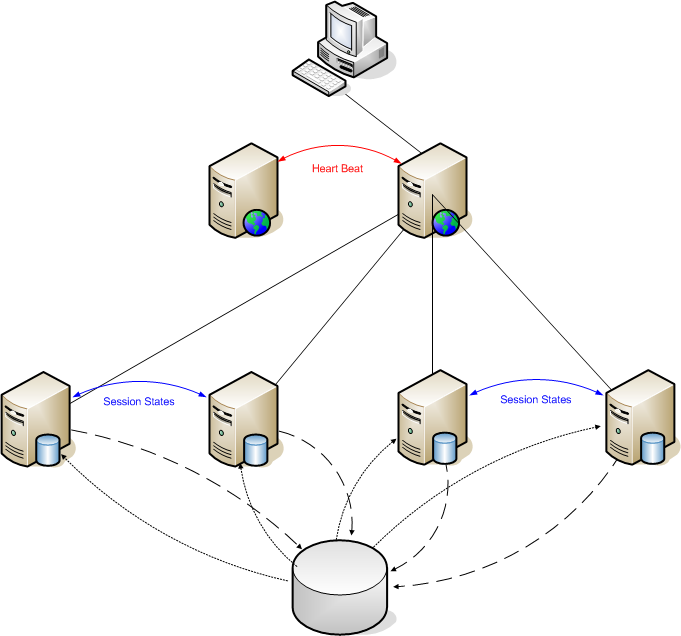
This represents a dedicated Apache box used for load balancing, and it forwards requests to the main app servers. This server requires very very little by way of disk storage.


This represents a dedicated JBoss application server. It also has a read-only version of the main MySQL database so all SELECT statements can be run locally.


This represents a logical SQL server, the master database for the application. Its platform will vary as the application grows from a stand-alone database to a multi-master cluster. It is the only database in the system that is written to by the application.


Dashed links indicate when a change is committed to user data. Updates aren’t written to the local database on each application server, but written back to the master database.


Dotted links indicate when updates to the “slave” databases from the “master”. The master database is responsible for ensuring that the slaves are kept up-to-date.


Blue links indicate servers that are sharing user session states, which means users will not lose anything should we have an application server outage.


Red links are the “heart beat” links that the load balancers are monitoring. If the current load balancing server stops responding (per its heart beat) then the backup will pick up its duties (as well as taking over the live IP address).

Phase 1 (Development / test)

This is the most basic configuration, with two application servers sharing user session states (one load balancing).The development and test environments will be set up like this.

Phase 2 (Minimal live)

A basic live environment; this removes the single point of failure on load balancing. You will have to decide as to the format of the logical SQL Master (i.e. whether “Enterprise” or “Cluster”). At this stage you will need to do full load tests (to failure) and decide if it will meets your needs if a phase 3 set-up is required for go-live.

Phase 3 (Mid-range live)


This phase includes the addition of two more App servers. These do not share session states with the initial pair in order to limit the chance of a cascade failure. At this point the option of a delayed read slave for the master database server should be raised as this provides an excellent option to rectify large data corruptions without the need to resort to a full restore.

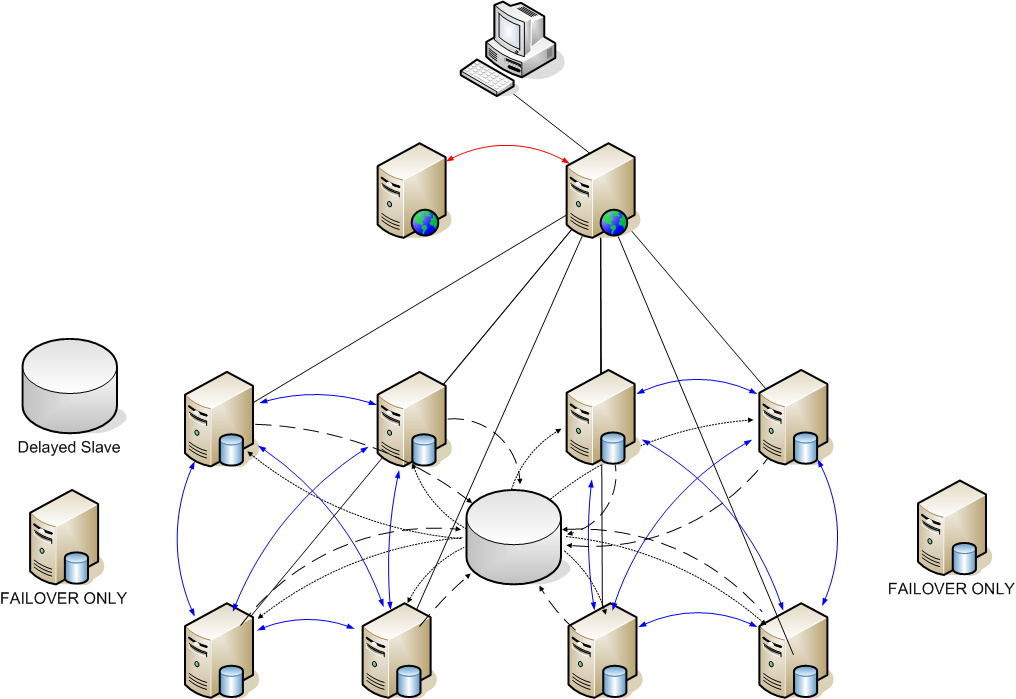
Phase 4 (Enterprise level)


Classed as a “fully populated” stage. Beyond this architecture, a dedicated load balancing system (hardware) would be required, distributing the application over multiple data centres, or move to a cloud-based infrastructure.
This phase comprises two groups of four servers sharing their user sessions, with two fail-over servers to mitigate cascade failure. The master database is also clustered, and a delayed-read slave become necessary.

give me a yell if you want LDC to build this for you (or even more fun a app that would need it 🙂 )

Its good to help clients

The following quote was in a clients internal quarterly director’s update on the subject of Client Wins:

“Winning this lead confirms **** as a major player in the US airline market. The aviation team cited the new Claims Online tracking system, as well as ” … “as some of the key reasons for this win.”

I and Mark Barton wrote the system and its really nice to make a difference to a companies bottom line, this will be the third big difference I helped make during my time at my current main client, it feels good, after all even contractors have pride in their work 🙂 .

Vegan Katsu Curry 1st Try

Our household loves katsu curry, which is fine as im just a veggie, but you can’t get it in vegan form which makes sharing a happy curry a bit of a pain, so here is the first run at a full vegan version.

UPDATE: I keep changing the ingredients to make it taste better

We did the rice first, as we are lucky enough to have a Zojirushi rice cooker (which keeps the rice warm for 12 hours) and a sack of sushi rice, I would urge that you get some proper sushi rice.

Next onto the:
Sauce
1 tbsp vegan butter (we use ‘Pure’)
3 garlic cloves, chopped
1/2 large onion, chopped
2 Red Apples, chopped
600ml water
1 banana, chopped
1 tbsp maple syrup
1/2 tbsp ground turmeric
1/2 tbsp hot curry powder
1 tbsp ketchup
250ml vegetable stock (see below)
1 tbsp cornflour
1/2 tbsp salt
1 tbsp ground black pepper

tbsp = table spoon (i forgot so i’ve put it here)

In a large saucepan, heat together the butter, garlic, onion and apple, mix together and fry briefly. Add in 350ml water, then the banana, maple syrup, turmeric, curry powder and ketchup. Bring to the boil. Add in the stock. Mix together the remaining water (250ml) with the cornflour and add to the curry with the salt and black pepper.

Let simmer for about 20-30 mins (with the lid off), your curry should have a nice gloppy consistency, if it looks a bit watery let it simmer for a while longer.

At this point we pummelled the curry with a potato masher to breakup up any of the apple and banana chunks left, but if you’re posh you can use a blender (when it’s a bit cooler) UPDATE: I really do recommend using the blender it makes it look much nicer.

Once you have a curry you like the look of, its onto the fried stuff:, if you have the option to get hold of pre fried or braised tofo you can do this alternative Vegan Katsu Curry 2nd Try

Fried Stuff
whatever flat “disk-like” veggies you want to cook, We used slices of aubergine (eggplant) but courgette (zuccini) or sweet potato is good as well

1/2 cup flour
1/2 tsp salt
1/4 tsp pepper
1 cup vegan breadcrumbs
3/4 cup water
1 tbsp ground flaxseed combined with 3 tbsp water microwaved for 10-15 seconds at 900W (mimics an egg)
vegetable oil for frying

Heat the vegetable oil to 350 degrees.
Put the cup of water/flax mix in a bowl, the flour, salt and pepper into another bowl, and the vegan bread crumbs in a larger bowl or shallow dish. Wipe/spread/dip the veggies with water/flax mix, letting the excess run off, then dredge in the flour mixture and let dry for about 2 minutes. Wipe/spread/dip the veggies with water/flax mix once more then dredge in the breadcrumbs until the entire surface is covered. Fry the veggies in the vegetable oil until they are golden brown. Serve with the rice on the bottom covered with the curry and the veggies on top, it also tastes great with a bit of soy sauce

Vegetable Stock
We used what vegetables we had in the house (potatoes, leeks, the left over onion from the sauce, a chilli pepper and a garlic clove) put them in a pan with some vegan instant stock (marigold’s swiss vegetable Bouillon), brought them to the boil and simmered for about 20 mins.

(you could just use 2 cubes of oxo vegetable stock if you want it done quickly)

(this picture was before we had mashed the curry and rendered it down a bit more, this improved the visual side but it still tasted as good)

Old Comments

Mark Myers(03/01/2011 11:32:56 GMT)

@coatsie because its a Japanese curry dish

Coatsie(07/12/2010 18:54:15 GMT)

Just one question Mark – Why sushi rice and not basmati ?

en_GB location, Eclipse and the flash builder plug in

If you are UK resident you may have discovered Flash builder 4’s nasty little habit of bleating about the missing en_GB location, the reason for this is, as a Brit you have quite rightly set your eclipse for that location, but somewhere in the second beta of Flash builder 4 Adobe decided the green and pleasant land was unworthy of its own location and stripped it out of the build, just renaming the en_US location directory does not work as a fix, you have to right click on your flex project –> select properties, and set the compiler options to “-locale en_US” as per below

Sigh!, i never thought being a English man would be considered a minority group

HTML5 and CSS3

Here is the results of another skillsmatters free talk, this one on HTML5 and CC3 and was presented by www.brucelawson.co.uk (@brucel )

Bruce was an excellent speaker and gave an amazing 101 session using only notepad++ which was nice (I have personally been accused recently of missing out the basics so its good to see how it should be done), you have all heard so much on this subject before, that I’m just going to bullet point the bits i took away from the session,

  • He was at some pains to point out what HTML5 was and what it was not (ie its not another way of saying Web 3.0 or “just not flash”),
  • He was definite on the point that HTML5 WILL NOT KILL FLASH, but it will provide people with a choice for a lot of functions that currently you can only do with flash.
  • There was a lot of emphasis on coping with screen readers and making content easier for computers to parse intelligently and how HTML5 is better for that.
  • Quite a lot of the tags have been redefined e.g. small = “small print in a contract” rather than “little in size”
  • Most of HTML5 is JavaScript (50%+ of the spec)
  • HTML5 does not care about quotes (its in the spec not just lazy)
  • HTML5 does not care about case (its in the spec not just lazy)
  • HTML5 ignores stuff it does know (like CSS)
  • It has things like sliders and calendar pickers built in (its things like this that makes people look at it as an alternative to flash)
  • Validation is build in (fairly crude but very like a jquery validator and he did say it would get better)
  • The video element is really rather good (you can tab in and out and make it easily grow and shrink etc. which is hard to do on flash), but the much published codex problems are quite real, you have to currently encode 2 versions of your video: ogv and mp4 (this was caused by apple and nokia), webm could hopefully put a end to the problem. for old browsers you can use the current embed elementOn CSS3
  • CSS3 is Amazing!!! (transform and transition and webfonts)
  • On CSS3 currently you have to put a “display:block” for ALL HTML5 elements you are using, as no browser currently supports them.
  • The CSS5 media functions are really cool but I’m not going to talk about them as Ben Poole has just used them in anger and I’m hoping a bit of peer pressure will force him to write a proper bloody blog entry.
  • Layered background are amazing (with good png transparency)
  • Arrrrh!! where was background size when i wanted it for my client recently!!Code Snippit
    to make IE8 and below apply CSS to HTML5 you have to add the following:
    document.createElement(‘xxxxx’); for each html5 tag you use, e.g.

    document.createElement(‘header’);
    document.createElement(‘nav’);

    and you have to include a “body” element some where on the page

    Links

    Recommended validator: html5.validator.nu
    To see how well you code parses running it by: http://www.nvda-project.org/
    The Best place for free webfonts: http://www.fontsquirrel.com/