One thing I’ve noticed in large, established organisations, particularly in finance, is that their internal processes for provisioning resources (be it cloud services, personnel, or any shared resource) are always in a state of change or apparent “improvement.”
New cost cutting exercises, updates due to regulation or industry standards, and attempts to “improve” how things get done are constantly in play. These initiatives are rooted in good intentions, reacting to external factors or seeking efficiency, but they inevitably bump into active projects.
When Projects Become “Guinea Pigs”
Picture this: as a project manager, you estimate three weeks for a task, only to have it balloon into eight because your project is chosen to pilot a new process. This happens all the time. Large organisations often see an ongoing project and decide it’s the perfect candidate to test that next “Major Upgrade” to the infrastructure.
Suddenly, timelines slip, and no one could’ve predicted it. Voices get raised, people start blaming each other, and you find yourself wondering if you can just do things the old way to stay on schedule. Meanwhile, the process-improvement folks push back because they don’t want to delay their innovation.
How to avoid grumping at each other
If it looks like your project might be the next guinea pig, try to get out in front of it. As soon as you get a hint that someone wants to apply a new process to your work:
Ask why: Make sure you understand the rationale, so you can feed it back to the busness in case of delay.
Negotiate timing: See if you can stick with the old way for development and switch over in user acceptance testing (UAT). This gives you some breathing room and doesn’t derail the entire project.
That way, you avoid appearing hostile to the team driving process improvements while still guarding your delivery timeline. Yes, it’s messy, and yes, it might slow things down. But with a proactive approach, you can at least minimise the chaos and keep relationships cordial.
I have hated status updates all my life because I feel that people should already know what the heck is going on if they’re involved in something.
But as I’ve gotten older, I started to realise why people ask for them. However the next and proper question is, if you have to have a status update, then WHAT is a good status update?
And here, I think I diverge from the majority of PMs most people think a good status update is a status update that tells you something you want to know, i.e., good news. I disagree.
A good status update just gives you the status of what’s going on so that you can make informed decisions. That might sound like a minor thing, but it’s a major thing to those who are giving you the information to make that update to powerful people.
If everyone thinks that you will only accept good news as part of your update, then they will not turn up to your meetings. They will not give you the truth. They will not even be available to find because frankly what is the point?
But in reality as long as they tell you what’s going on and give you enough information to show that people are making an effort and that whatever progress can be made is being made toward a resolution, that is a good status update.
Then it is your job as a manager or project manager to take that and fight the battle with the stakeholders or the clients. It is not the responsibility of subject matter experts, be they developers, support staff, or business people, to give you good news, and only good news. You’re paid to manage projects, so manage them.
Ownership and responsibility in IT organisations, especially at scale, can feel like a never-ending battle. In fact, it’s rare to find any corporation that doesn’t struggle with it.
This challenge becomes even more complex with the rise of cloud services, where nebulous infrastructure and cross-functional dependencies blur the lines of accountability. Here’s a closer look at why ownership is so difficult to define, and some practical steps for making it work.
1. Understanding the Ownership Challenge
People want power without overhead: Many individuals appreciate the influence that comes from ownership but are less enthusiastic about the responsibility of ongoing support, budgeting, and paperwork.
Cloud systems complicate matters: Traditional IT ownership is usually tied to physical devices—servers, switches, and firewalls. In a cloud environment, resources are abstracted and often spread across multiple locations or services. This makes it harder to say, “That belongs to me.”
Support is expensive and convoluted: When something breaks in a cloud-based system, it can be difficult to know which component is responsible, leading to finger-pointing, delayed resolutions, and confusion about who should pay for fixes.
2. Why Cloud Ownership Is So Hard
No clear line of demarcation: A cloud service could span several different areas—networking, databases, microservices, etc.
Cross-billing and cost centres: In many organisations, different departments pay for different parts of the infrastructure, and nobody wants unexpected charges.
Uncertain support paths: When a service fails, teams must track down the specific issue. The blame game often starts, and ownership becomes something people try to avoid rather than embrace.
3. The “Last Person Touched It” Dilemma
As projects come and go, ownership often falls to the last person who made a change. This unofficial assignment can persist, even if the individual isn’t the designated owner. When something breaks, teams scramble to find that “last person” and push the responsibility (and cost) onto them.
4. Three Layers of Ownership
Official (Paper) Owner
Who they are: The individual or team listed on the org chart.
What they do: They may have the budget authority and are often responsible for official sign-offs.
What’s the problem: If they don’t respond to issues or don’t want to be involved, they may not be the real point of accountability or person that can get things done in a crisis such as disaster recovery.
Escalation Owner
Who they are: Often a senior architect or hands-on manager.
What they do: Steps in when urgent decisions are needed, especially if the official owner is unresponsive.
What’s the problem: They end up doing the real work of ownership, even if it’s not on paper.
Issue Owners
Who they are: specialists who know a particular system or tool inside and out.
What they do: Fix problems that no one else can.
What’s the problem: Because they’re indispensable, others bypass official channels to get them to help, often without official requests or funding.
5. Common Pitfalls of Poor Ownership
Overworked Subject Matter Experts: Specialists become overwhelmed by ad-hoc demands, in the worst case getting burnt out and leaving.
Cost Center Confusion: Bills and charges get shifted around, causing tension and delaying project progress.
Blame Instead of Praise: Support work rarely gets celebrated, but any outage can spark intense criticism.
Stalled Innovation: When senior management fears their team will be stuck with endless support work, they may resist taking on new projects.
6. Strategies for Clear Ownership
Define Ownership Boundaries
Be explicit about who owns what, especially in cloud environments.
Clearly demarcate functional areas: networking, databases, infrastructure, etc.
Eliminate confusion by documenting responsibilities in easily accessible formats.
Establish Rock-Solid Budgets
Make sure all stakeholders know how costs are allocated post-deployment.
Prevent “stealth” additions to production that drive up expenses for unsuspecting teams.
Maintain Transparent Support Models
Articulate what support includes and how it is funded.
Set expectations for response times, communication channels, and escalation paths.
Align Costs with Accountability
If someone owns a service, ensure they also have the budget to maintain it.
Provide clear metrics to show how usage increases cost, justifying budget requests.
Recognize and Reward Good Support
Make support work visible and acknowledge achievements.
Encourage a culture where reliability is celebrated, not taken for granted.
Conclusion
Clear ownership in large-scale IT environments, and particularly cloud-driven ones, requires effort, transparency, and a willingness to tackle the uncomfortable parts of responsibility.
By defining boundaries, clarifying budgets, and establishing clear support expectations, organisations can reduce the chaos of finger-pointing and create an environment where ownership is both feasible and rewarding.
Key Takeaways:
Clarify who owns each resource and service (on paper and in practice).
Align budget authority with the responsibility for support.
Keep communication open and transparent so everyone understands costs, dependencies, and escalation paths.
Foster a culture where taking ownership is valued and rewarded, minimising the stigma of blame.
Doing these kinds of things can break the cycle of avoidance and ensure that ownership is something teams want to hold, rather than something they sidestep at all costs.
In a large corporation, would you think communication would be as valuable as real, honest-to-goodness hard work?
Well, the short answer is yes.
It’s easy to get so absorbed in solving technical and business problems that we forget how critical it is to keep everyone else in the loop. You bury your head in code or hardware issues, tackle one problem after another, and hope that once you emerge ‘voilà’ you’ll be hailed as the hero who got it all done.
But here’s the catch: long-term projects, especially those spanning months or years, demand consistent communication. Your customers, whether internal teams or external clients, need updates. Their priorities shift, their customers ask questions, and they rely on your transparency to know what’s happening. If you disappear and hope they trust you, don’t be surprised if they assume the worst and act on it in ways that can knock everything off track and make your hard work pointless. Lack of communication breeds doubt.
A Dedicated Role for Communication
This is why it’s best to have someone (not one of your buried-in-code tech staff) serve as a dedicated liaison. That person’s job is to keep everyone in the loop about progress, delays, or changes. Your tech team’s time is too valuable to be wasted on constant status reports, but that doesn’t mean no one should be doing it. It’s crucial to maintain trust by ensuring your customers know exactly what’s going on, even if the news isn’t always great.
Dealing with Delays and Outrage
Of course, consistent communication means facing frustrated customers head-on. People will be upset if a deliverable is late, or if you can’t give them everything they want right away. But that’s better than letting them stew in uncertainty. Yes, many tech professionals want to please everyone and might feel guilty about having to say “no” or “not yet,” but being honest builds trust in the long run.
Agile as a Communication Framework
Although agile methodologies can sometimes feel tedious, one thing they do well is set realistic expectations. Sprints, user stories, and burndown charts are all tools that help show how long something will take and why. When customers push for more, you can point to the sprint plan and timeline, then let them negotiate priorities with each other, rather than with you. Once they agree on what’s most important, you can adjust and proceed. Bottom Line
Hard work is valuable, but without communication, even the hardest-working team risks losing trust and damaging relationships. Keep the lines open, stay transparent about what’s going on, and let your customers know exactly what to expect. In the end, this approach saves everyone time, energy, and stress.
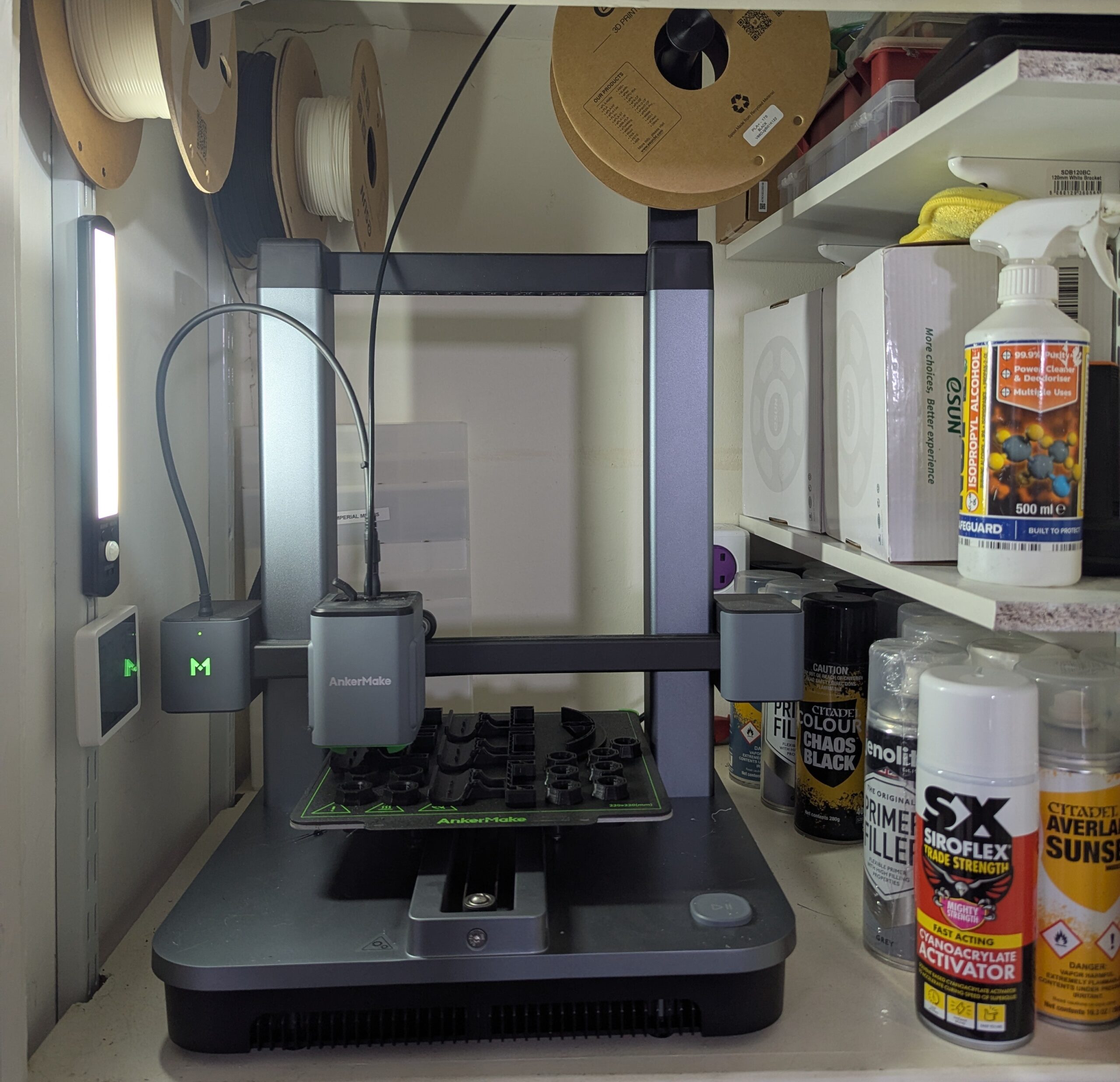
3D printers are quickly becoming as common in our homes as any other domestic appliance, at least, that’s how it feels these days. I’ve had one for about a year now and use it about as often as I use a jigsaw or a carpet cleaner. If you’re just starting out on your 3D printing journey (or deciding if you even want to), here are some practical, real-world tips, especially for those living in England’s urban areas.
1) Treat It Like a Domestic Appliance
Yes, you can take 3D printing up as a hobby, tweaking every setting, experimenting with exotic filaments, and chasing the cutting edge. But don’t stress if your printer isn’t revolutionising your life immediately. For many people, it’s simply another tool in the home. Use it for everyday tasks, quick fixes, or other hobbies. You don’t have to turn it into your entire world.
2) If It’s Broken, It’s Probably You
Failed print? Weird warping or stringing? Nine times out of ten, the culprit is user error. Maybe you forgot to clean the print bed, left greasy fingerprints all over it, or fiddled with software settings that you didn’t fully understand. 3D printers are more reliable than we give them credit for, most problems trace back to how we set them up or maintain them.
3) Essential Accessories (Don’t Go Overboard)
It’s tempting to buy every accessory under the sun. If you want just the essentials, however, here’s a short list:
A paving stone: Putting your printer on a paving stone helps reduce vibrations and keeps it stable. It’s cheap, nearly indestructible, and incredibly effective.
Isopropyl alcohol (IPA) in a spray bottle: Ideal for cleaning your print bed and other parts of the printer. Buy it in bulk and decant it into a smaller spray bottle for daily use poarticually for cleaning the filament bed.
Callipers: Handy for measuring the thickness of parts or filament and checking dimensions of areas you want your print jobs to fit into.
A decent steel ruler: Because bad measurements are the murder of all fun.
Other add-ons depend on your environment. If you have a cupboard or closed space for your printer, you might not need a filament dryer. i just store my part-used filament above the printer and that keeps it dry enough in England
4) Noise Is a Factor
3D printers can be loud, and long print jobs sometimes run overnight. If you’re in an urban setting with close neighbours, or if you work from home and worry about background noise on calls, consider placing your printer in a cupboard or enclosed space. A simple trick is to hang towels in front of the cupboard door to help dampen the sound. Fancier enclosures are nice, but towels are cheaper and surprisingly effective.
5) Don’t Overcomplicate Filaments
For FDM or filament printing, which is the most common kind you will see, just find a reliable filament brand (for instance, eSun PLA+), pick a couple of colours you like (black and white often cover most household needs), and stick with them. You can certainly go wild with speciality filaments, but for daily, practical prints, you don’t need an entire rainbow or a dozen exotic materials.
6) Resin Printing? Probably Not
If you’re in a small urban space (particularly with kids or pets), resin printing is likely off the table, much as they are awesome for highly detailed printing for things like models. Resin is toxic, the fumes are unpleasant, and disposing of resin waste responsibly can be a nightmare. Unless you have a dedicated, well-ventilated workshop or shed (far from common in many city flats and terrace houses), an FDM printer is your safest bet.
7) Ignore the “Arms Race”
The 3D printing market is full of new “game-changing” models every other month. Don’t get caught in the hype. Choose a printer that’s well-supported, does what you need, and fits your budget. Treat it like buying a car: you want reliability, availability of spare parts, and basic features that meet your needs. Also, 3D printers are great for helping out friends who don’t have one. Filament is relatively cheap, and you can ask them to buy you a spool if you end up printing a lot for them.
8) Be Realistic About Recycling
PLA and other common 3D filaments are technically recyclable, but don’t put it with your other recycling plastic, as the centres can’t tell them apart. You’ll likely end up with a bin of wasted prints and supports. If you truly want to recycle, you may have to pay a specialist service. Be aware that “biodegradable” doesn’t mean it vanishes in weeks or months—it can take years. I use a propper dedicated recycling company and fill up a box which i have to have paid to be taken away (3dprintingwaste.co.uk)
9) Beware of Supports
Supports can help print more complex designs, but they waste filament, increase print time, and can be frustrating to remove cleanly. Wherever possible, seek out support-free designs or modify models to minimise the need for them. Your printer will thank you, and so will your recycling bin.
10) Finishing Touches (Without Overdoing It)
Super Glue: Works brilliantly for bonding PLA prints. The resulting join is often stronger than the original piece. Sanding: Go easy, sanding creates microplastics. A good filler primer (e.g., Genolite Original Primer) can smooth out surfaces if you care about the final finish. Painting: If you’re painting, a basic primer plus acrylic paints do the job nicely. Again, keep an eye on fumes and ventilation.
11) Choosing a Brand
Plenty of manufacturers want you to treat your 3D printer like a vacuum cleaner: buy replacement parts at their schedule and pay a premium for “official” bits. If that puts you off, consider something more open-source friendly like Prusa. They’re pricier and not as “plug-and-play” polished, but you’ll have more freedom to upgrade and maintain your printer without feeling like the company is constantly trying to sell you more parts. In the end, the brand you pick should be one that you trust to give you decent support (whether official or community-based), reasonable spare-part availability, and a long service life. If you don’t mind the consumerist approach, pick whatever brand suits your budget and tolerance for maintenance.
Final Thoughts
3D printing has grown beyond the realm of hardcore hobbyists tinkering in their sheds. It’s now a practical, everyday tool, especially for quick home fixes or small, personalised projects for those in an urban environment. You do have to think about noise, ventilation, and space more than someone in a big house with a sprawling workshop. But once you have those sorted, a 3D printer can be a wonderful addition to your home. Just remember: keep it clean, keep it stable (hello, paving stone!), buy good filament, and don’t worry if you’re not pushing the cutting edge of 3D printing technology. Sometimes, a simple printer that “just works” is all you need.