Welcome to the second part of the Salesforce for Domino Dogs series. This one is a monster, but don’t worry we will be revisiting and clearing up some of the complex parts in other blog posts. What was a simple thing in Domino is quite complex in Salesforce and for a variety of very good reasons. So… scheduled agents.
Scheduled Agents: These little sods are the pain of many a Domino admin’s life. Personally I blame them for the lock-down of many a Domino server from the free-for-all that was so empowering to users, but sometimes there is no other way to get round limits or deal with certain triggered activities.
In Salesforce scheduled processes are a bit more complex than you might be used to, and this is not just a Salesforce thing, but a cloud thing—no cloud provider wants their platform just churning along in the background eating up cycles and I/O time.
So let’s break it down:
- The code that does stuff
- The scheduled task that the code sits in
- The schedule itself
1) The Code
So this CAN just be any bit of Apex you want, but most of the time you will actually end up using batch apex. Batch Apex is a whole set of articles in its own right, but in this case it’s just a way of getting round the Apex limits.
… hmmm that does not help. OK let me explain:
You know how with Domino scheduled agents, they will only run for so long before the agent manager shuts it down? This is to stop you writing rubbish code that screws up the system. Apex has a load of limits just like that, and the one that hits quite often is the limit that you can only send 10 emails using Send() in a given transaction (you can send 1000 bulk email per day). To get round this limit you have to “batch”, or break up your code into chucks. In Domino this would be like saying we want to process a whole view’s-worth of documents, but in chunks of say five documents at a time.
An empty bit of batch apex looks like this:
global class NotifiyAllUsersInAView implements Database.Batchable<sObject> {
    // The start method is called at the beginning of the code and works out which objects this code is goign to run agains.
    // It uses an SOQL query to work this out
    global Database.QueryLocator start(Database.BatchableContext BC){
    }
    // The executeBatch method is called for each chunk of objects returned from the start function.
    global void execute(Database.BatchableContext BC, List<Contact> scope){
    }
    //The finish method is called at the end of a sharing recalculation.
    global void finish(Database.BatchableContext BC){
    }
}
Let’s take it apart. First we will use the “start” function to get the list of objects we want to work through, so we take the empty function:
    // The start method is called at the beginning of the code and works out which objects this code is goign to run agains.
    // It uses an SOQL query to work this out
    global Database.QueryLocator start(Database.BatchableContext BC){
    }
… and add a search to say get all “contacts” in Salesforce. We only need the email address for these contacts so we add that as one of the fields which it gives us:
    // The start method is called at the beginning of the code and works out which objects this code is going to run against
    // It uses an SOQL query to work this out
    global Database.QueryLocator start(Database.BatchableContext BC){
        return Database.getQueryLocator([SELECT Id, Email FROM Contact]);
    }
Next we want the empty “execute” function which will do whatever we want with each chunk of objects it is sent:
    // The executeBatch method is called for each chunk of objects returned from the start function
    global void execute(Database.BatchableContext BC, List<Contact> scope){
    }
So in this horrible bit of code, the chunk of objects is passed in a reference called “scope” — we are then just iterating the objects and sending an email for each contact (you can see the email address stipulated in the “start” being passed in using “c.Email”):
    // executeBatch method is called for each chunk of objects returned from the start function
    global void execute(Database.BatchableContext BC, List<Contact> scope){
      for(Contact c : scope){
          Messaging.SingleEmailMessage mail = new Messaging.SingleEmailMessage();
          String[] toAddresses = new String[] {c.Email};
          mail.setToAddresses(toAddresses);
          mail.setSubject('Another Annoying Email');
          mail.setPlainTextBody('Dear XXX, this is another pointless email you will hate me for');
          Messaging.sendEmail(new Messaging.SingleEmailMessage[] { mail });
       }
    }
Finally we need an empty “finish” function which runs when all the batches are done:
    //The finish method is called at the end of a sharing recalculation.
    global void finish(Database.BatchableContext BC){
    }
So let’s send a final email notification to the admins:
    //The finish method is called at the end of a sharing recalculation
    global void finish(Database.BatchableContext BC){
        // Send an email to admin to say the agent is done.
        Messaging.SingleEmailMessage mail = new Messaging.SingleEmailMessage();
        String[] toAddresses = new String[] {emailAddress};
        mail.setToAddresses(toAddresses);
        mail.setSubject('Agent XXX is Done.');
        mail.setPlainTextBody('Agent XXX is Done.');
        Messaging.sendEmail(new Messaging.SingleEmailMessage[] { mail });
    }
Put it all together and you get:
global class NotifiyAllUsersInAView implements Database.Batchable<sObject> {
    // String to hold email address that emails will be sent to.
    // Replace its value with a valid email address.
    static String emailAddress = 'admin@admin.com';
    // The start method is called at the beginning of the code and works out which objects this code is goign to run agains.
    // It uses an SOQL query to work this out
    global Database.QueryLocator start(Database.BatchableContext BC){
        return Database.getQueryLocator([SELECT Id, Email FROM Contact]);
    }
    // The executeBatch method is called for each chunk of objects returned from the start function.
    global void execute(Database.BatchableContext BC, List<Contact> scope){
      for(Contact c : scope){
          Messaging.SingleEmailMessage mail = new Messaging.SingleEmailMessage();
          String[] toAddresses = new String[] {c.Email};
          mail.setToAddresses(toAddresses);
          mail.setSubject('Another Annoying Email');
          mail.setPlainTextBody('Dear XXX, this is another pointless email you will hate me for');
          Messaging.sendEmail(new Messaging.SingleEmailMessage[] { mail });
       }
    }
    //The finish method is called at the end of a sharing recalculation.
    global void finish(Database.BatchableContext BC){
        // Send an email to admin to say the agent is done.
        Messaging.SingleEmailMessage mail = new Messaging.SingleEmailMessage();
        String[] toAddresses = new String[] {emailAddress};
        mail.setToAddresses(toAddresses);
        mail.setSubject('Agent XXX is Done.');
        mail.setPlainTextBody('Agent XXX is Done.');
        Messaging.sendEmail(new Messaging.SingleEmailMessage[] { mail });
    }
}
So now we need to call this code
2) The Scheduled “Agent”
The code we have just written won’t run in a schedule on its own, we need to wrap it up in a bit of code that can run on a schedule and decide how big the chunks will be. In this case they can’t be more than 10 as we will hit the Apex limits for sending emails. An empty schedule wrapper looks like this (I have called mine ‘Scheduled_Agent’ but you can call it anything):
global class Scheduled_Agent implements Schedulable{
    global void execute (SchedulableContext SC){
    }
}
Now let’s create a new instance of the batchable code we created in section 1, tell it we want it to run in batches of 5 records or objects, and tell it to execute.
global class Scheduled_Agent implements Schedulable{
    global void execute (SchedulableContext SC){
      Integer batchSize = 5;
      NotifiyAllUsersInAView batch = new  NotifiyAllUsersInAView();
      database.executebatch(batch , batchSize);
    }
}
Code bit all done!
3) The Schedule
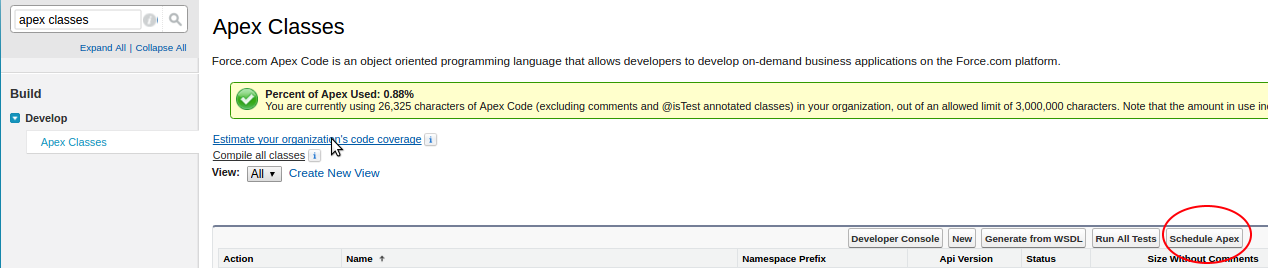
Now it comes time to actually schedule the code to run at a certain time, you can set this up via the user interface by going into Setup, searching for “Apex Classes”, and selecting the result:

Select “Scheduled Apex”
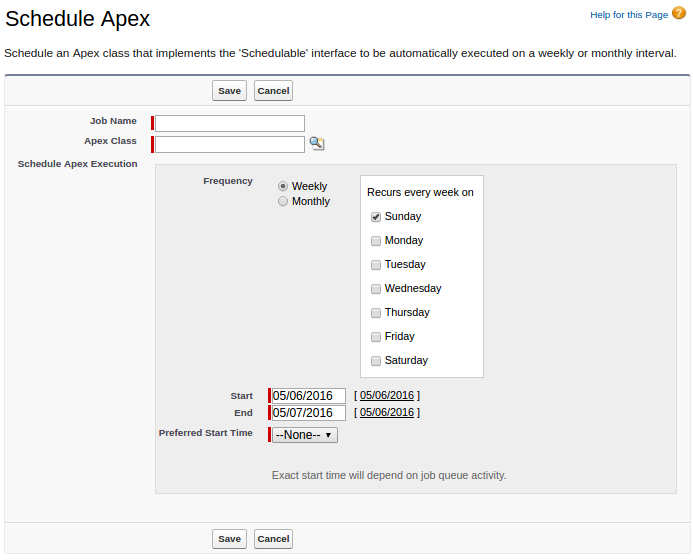
As you can see, the options are limited to, at most, a daily run—you can’t specify it to be any more frequent. However, we need to run to more often than that.
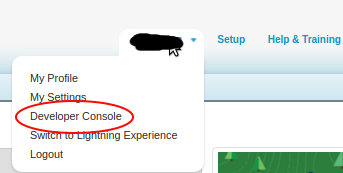
First open up your developer console, by selecting your name on the top right and picking it from the drop-down.
Now open up the “Execute Anonymous Window” from the debug menu.

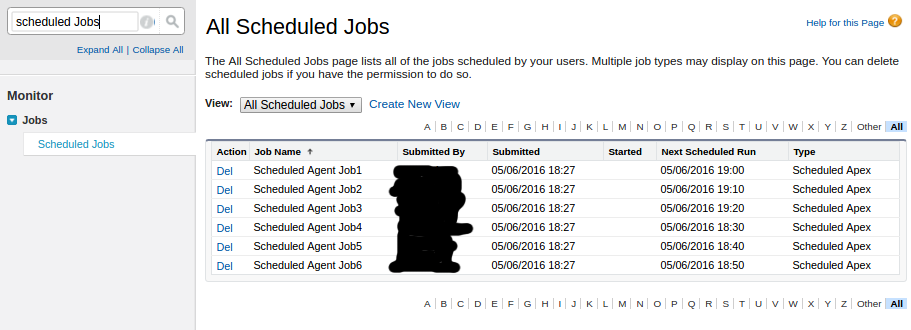
You can now run Apex code manually, and as such you can schedule jobs with a load more precision using a Cron String. In this case we want to run the agent every 10 mins within the hour, so we create a new instance of our “Scheduled_Agent” scheduled class and schedule it appropriately:

Click “Execute” and you can see the jobs have been scheduled. It should be noted that you can only have 100 of these in your org and this uses up 6 of them, so some planning would be good.
And there you go, scheduled agents. Let the legacy of horror continue!
 stand (The rest of the team are insisting I wear a shirt and everything).