Hi Guys its that time of year again here is the first load of rubbish for this year.
news letter no 43
The Rantings of the barely human.
Hi Guys its that time of year again here is the first load of rubbish for this year.
news letter no 43
Customising the IBM Connections experience is a growing field, and the activity stream seems to be one of the most popular area for those customisations to take place…
It all started with this [blog entry: I love it! embed.ly in IBM Connections](http://www.lbenitez.com/2011/06/i-love-it-embedly-in-ibm-connections.html ) by Luis Benitez and a clients need to not use a third party library with associated API calls to generate their updates, and ended with a bit of swearing and chunk of JavaScript.
So what we want to do is loop thought all the status updates on any given connection page, and if we find a suitable bit of text i.e. a url we are going to pop that URL in an Iframe, but basically we could do anything we wanted
First lets steal most of the install instructions from Luis’s posting (these work for both V4 and V5 of connections)
<script src="https://ajax.googleapis.com/ajax/libs/jquery/1.11.2/jquery.min.js"></script>
– Save and close the file
– Edit footer.jsp
– Scroll to the bottom of the file and now its time to add our own code
<script type="text/javascript">
var customEmbed = {
    invoke: function(){
        //First Lets look for all the activity post contents and loop though them
        $(".lotusPostContent").each(function() {
        // we are looking for a youtube url in this example with regular expressions
        var pattern1 = /(http://)?(www.youtube.com|youtu.?be)/;
        var testhtml = $(this).html();
            //As we are continusly looping thought the page content we dont want to embed the extra content twice
            //So im checking to see if there is already an iframe in the post content, also im looking to see if the html
            //at the start of the .lotusPostContent contains a vcard class, as that means that is not a real post but
            //rather a "this posts was made by User X" kind of thing and can be ignore else you get mad nested updates
            if (pattern1.test(testhtml) && testhtml.indexOf("iframe") == -1 && testhtml.indexOf("<span class="vcard">") != 1) {
                $(this).append(customEmbed.addhtml($(this).html()));
            }
        });
    },
    addhtml: function(html){
        var pattern2 = /(http://)?(www.youtube.com|youtu.?be)/;
        var srcrul = html.match(pattern1);
        //here we have used match to get the url we want so that we can stuff it into the iframe
        return '<div><iframe width="500" height="600" frameborder="0" webkitallowfullscreen mozallowfullscreen allowfullscreen scrolling="no"src="' + srcrul[0] + '" ></iframe></div>'7;
    }
}
setInterval(function(){
    customEmbed.invoke();
},4000);
// I find that a 4 second loop is about right for this kind of thing
</script>
#####Notes:
– I’m using a setInterval vs a setTimeout, because some page navigation in connections only requests an update to the central pane not the footer and also we want items to update on the basis of user actions.
– I using $(this).append rather than directly updating the html as Connections uses a load of dojo attach for its social functions such as “like” buttons and messing with the HTML directly brakes these.
– The best place to test your Regular expresions is at [https://regex101.com](https://regex101.com/#javascript)
There you go, the template to do anything you want with status updates
† <WAS_PROFILE_ROOT> is where the profile for your app server is located, normally in windows somthing like X:IBMWebSphereAppServerprofilesAppSrv01
‡ <IC_INSTALL_ROOT> is where you installed connection on windows normally somthing like X:IBMConnections
I saw something the other day that is unfortunately rare these days, a company HAPPY with IBM/Lotus Notes..
Now roll back the clock 10 years and this was the case all-over, the once proud product that used to be my bread and butter and now only accounts about for about 20%-30% of my work (the rest being taken up by Java and Javascript on Websphere/Jboss/Node with a happy side line customising IBM Connections) was loved by a huge number of its users and they bought it in droves… so what did this this office have that kept them in this happy state?
It turned out to not be what they had but what they DID NOT have, they had no limitations on who could create databases on the servers* also they all had the full Notes client with the designer, so departments created apps just like they did in the old days, they took the standard templates and altered them to fit their needs just like the do with Excel spread sheets, MS Access databases and indeed to some extend Sharepoint,
Notes had not become controlled by the management and techno elite, it was used by everybody, there was no fighting for “engagement” as is the case for modern social platforms, it was achieved organically without the need for HR and marketing to stick their hoof in.
So if you want my opinion about the real reason that notes is not as popular as it used to be, blame IT and management for wanting to control everything, for taking the users that want to be pioneers and making them drones.
*Though there were a few sane guidelines
I don’t get up to Yorkshire half as much as I would like (it being my home for about 8 years of my life and where my dad took me hiking), I miss it a lot and any excuse will see me at Kings-Cross piling into a GNER train, however this time I had a great excuse, Rob Wills my fellow LDC’er asked me to come up so we could sit down and do a nice development to production environment for his latest project using Maven, Vaadin + plus plug ins, GIT, and AWS (some of the components were not playing quite as they should should so he wanted a second set of eyes)
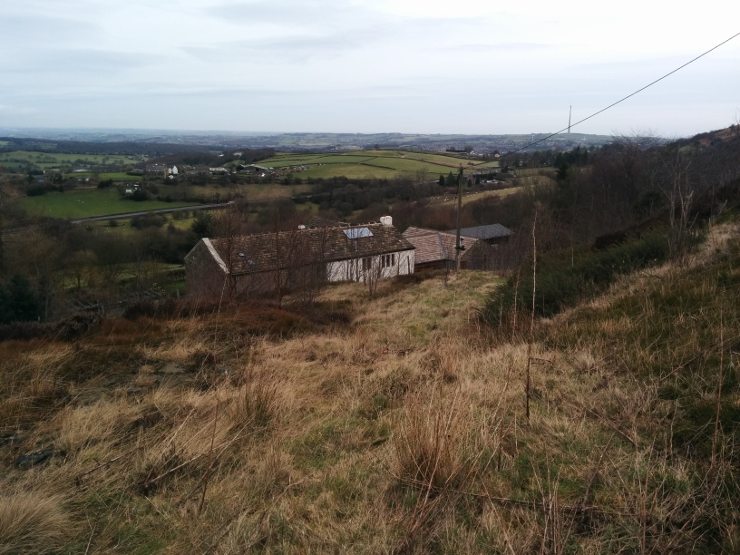
I got to stay at their fab house, well it’s actually 3 houses, the main house and the 2 guest houses you can see/rent them here http://www.holmefromhome.co.uk/
It has amazing views (and its not even a nice day)

The house is practically off the grid but has all the proper comforts, a wind turbine provides plenty of electricity (they feed more back to the grid than they pull from it, enough to run the awesome outside hot tub), the property has its own spring so is self sufficient water wise, but still has internet (my 3G even works up there), much to my surprise I even discovered they even had electric car charging port.


Its set in a few acre of its own land (moorland and lawns) more than half a mile from anyone else (perfect for parties)
After a hectic day of coding and swearing at Eclipse I was sent home with fresh picked kale (for my better half)…sigh!

This problem seems specific but its the age old “get details of parent document when you only have the child documents” problem now in the fun world of a client side application.
Problem: A page in an angularJs application contains a list of notes made by an attendee on a number of presentations.
If that presentation has been marked as complete then they you should be able to click on any given note and be taken directly to the slide they made the note on.
If however the presentation has not been made public then it should just be static text, the api call that returns the list of notes does not contain the public/notpublic details, so we have to make another API call to the presentations to find out if their are public.
However we want to keep the number of calls to a minimum and use existing code if suitable.
This project is using Restangular, described as an “AngularJS service to handle Rest API Restful Resources properly and easily”, which as far as I am concerned is both wonderful and bloody woeful. The framework tends to make hard things easy, and easy things hard. In this case I just want the JSON that a GET call returns. To do that, and not get all the extra objects that Restangular adds, you have to alter the root app.js of your app so that you can get an “original” response.
Bung the following code in the function that contains “function (RestangularProvider)” <– I am assuming that you already have Restangular up and working
        // add originalElement to the response so we can
        // have un-restangularized objects as well
        RestangularProvider.setResponseExtractor(function(response) {
          //console.log(response);
          var newResponse = response;
          newResponse.original = angular.copy(response);
          //console.log("response", newResponse.original);
          return newResponse;
        });
Now in the controller of the page you are displaying the notes on you want to add the following to the init ( ensuring that your “.service” contains “ApiRestangular” )
  init: function () {
        ApiRestangular.all('api/events/presentations').getList().then(
           function(successResponse) {
             angular.extend($scope, {
              presentationlist: successResponse.original
             });
           },
           function(errorResponse) {
           }
        );
This makes a Restangular call to the ‘api/events/presentations’ api and when it gets the result, it fetches the original JSON result and stuff its in the “presentationlist” variable in the $scope
You now have an in memory array you can search to get more info straight from the page e.g
 isPresentationPublic: function (note) {
          if (typeof this.$scope.presentationlist === 'undefined') {
            return false;
          } else {
            for (var i = 0; i <= this.$scope.presentationlist.length; i++) {
              if (note.idOfPresentation == this.$scope.presentationlist[i].id) {
                return this.$scope.presentationlist[i].ispublic
              }
            }
          }
      },
(It should be noted that this is pure user interface stuff, and not meant to be secure).