Review of Otter.AI

Software dictation has been around for absolutely ages,

All the way from early Dragon software, which used to take hours and hours to learn an individual, and even then wasn’t particularly good.

They have come on in leaps and bounds with modern phones chattering to the internet in order to do diagnostics and proper translation, but even then they’re not real time at true conversational speed over more than a short sentence.

When one claims to be absolutely amazing at transcribing, and able to do it for meetings and multiple voices, I have to say I was more than a little suspicious, and this is what Otter AI claims.

Now I didn’t want it for meetings. I wanted it for writing blog posts like this one, but I wanted to just rant while wearing a headset, and for it to keep up with me, rather than for me to stop/start or talk in a slightly stilted fashion. I find that even the Google or Amazon stuff only gets about 9 words in 10 right, and often get sentences scrambled, often because it interprets something I’ve said that is technologically or geekily specific, as a generic word.

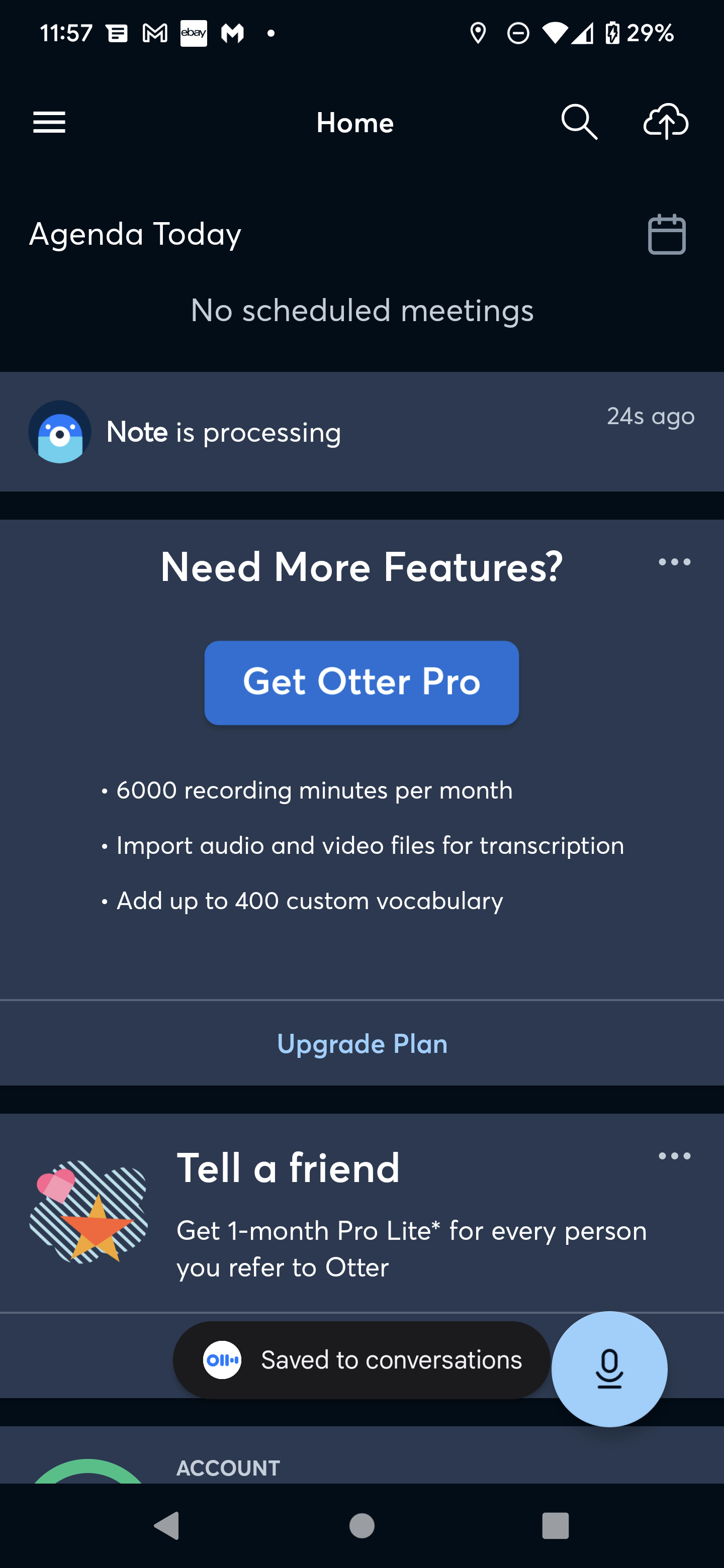
So I was introduced to Otter AI, and after I got past the forced way they are selling it, it is actually a very clever mixture of relatively new and old style technology.

When you use it, they say that you’re supposed to dictate into it, and then it will do magic to make everything amazing.

Don’t get overexcited. What it actually does is use standard speech to text for what you’re seeing in real time, where it gets the normal 9 out of 10 words right. And then once you’ve finished your meeting/rant, it will send your audio up to the internet and have another go at it with a lot more accuracy, as it can do it at its leisure.

This turns out to be a brilliant idea. Although they should really sell it better rather than just confusing the hell out of you.

Their target audience is obviously for long meetings or meeting note takers, not people who actually just want a decent accurate natural voice dictation app, the UI reflects that, the first few times I used it I desperately kept trying to stop and edit the text I was working on, but that is not how you do it.

The ordinary real time voice to speech conversion just acts as a general guide to what you have been saying, its not the final product, just say what you have got to say, save it, and let it clean everything up. Once you’ve got the hang of that as a process, then it’s a brilliant tool.

It’s amazing for dictating large formats or even quick blogs and notes. it has a good export feature which while not perfect, will happily export my monologues to WordPress and dump them into a standard post which I can then edit.

However again their market position is very off for my kind of usage. It seems to be only priced for people who are doing hours upon hours of meetings. Whereas people like myself that just want it for dictation are never going to come off the free tier, They’ve got no reason to. So they should really introduce say a £5 a month tier with some slight advantages (say a upgraded export to blog platforms). without that, people like me will never have a genuine reason to purchase it.

However all in all, if you’re wanting to write blog posts, or just take notes that you can then export as text. I couldn’t recommend it more.

All columns in a database

This is just an aide memoire for a function I use seemingly every week as part of my data integration work. It’s often easier to work through an Excel spreadsheet when you are doing data mapping rather than a SQL tool, as you can search for text and the like to help find a field.

This is just the SQL for doing that for the major SQL databases that you can come across.

Microsoft SQL

select schema_name(tab.schema_id) as schema_name,
tab.name as table_name,
col.column_id,
col.name as column_name,
t.name as data_type,
col.max_length,
col.precision
from sys.tables as tab
inner join sys.columns as col
on tab.object_id = col.object_id
left join sys.types as t
on col.user_type_id = t.user_type_id
order by schema_name,
table_name,
column_id;

Oracle

SELECT *  FROM all_tab_cols ORDER BY table_name, column_name, column_id

DB2

Select c.tabschema as schema_name, c.tabname as table_name, c.colname as column_name, c.colno as position, c.typename as data_type, c.length, c.scale, c.remarks as description, case when c.nulls = ‘Y’ then 1 else 0 end as nullable, default as default_value, case when c.identity =‘Y’ then 1 else 0 end as is_identity, case when c.generated = then 0 else 1 end as is_computed, c.text as computed_formula from syscat.columns c inner join syscat.tables t on t.tabschema = c.tabschema and t.tabname = c.tabname where t.type = ‘T’ order by schema_name, table_name

MYSQL

select column_name from information_schema.columns
where table_schema = ‘your_db’
order by table_name,ordinal_position

Dyslexia and Blog posting

I have dyslexia and while it is often considered a liability, I have never found it so, in fact it makes my life easier, you’re better at maths, you’re better at logical puzzles etc etc

However it does still bite me a little bit when I’m writing blog posts, I simply don’t see works that are just a little wrong, I don’t see where sentences don’t make any sense. The traditional way of getting round this it’s to copy and paste the text you have just written into a new format then reread it but that takes time and often doesn’t work

Enter the latest in the internet age, half the time now for blog posts I simply dictate them and then go back and review them. Gone are the days of dictation software taking ages to learn your voice and making more mistakes than it is worth, this post itself was just done via a phone in a couple of minutes, but even with modern technology mistakes are made, things don’t work out or things simply don’t scan when I read them back, but there is an easy fix, purely by accident I bumped into Amazon Polly. I just thought it was as a cool little WordPress plugin that converted all of your blog posts to speech, but now I’m the main user of it, whenever I do a blog post before publishing it I simply preview it and get Amazon Polly to read it back, it’s amazing how much that clears up bad words bad phrases and non existent punctuation

Give it a try and see what I mean 


The best USB-C hub

As just about all computers now use USB-C as their main port, most of the historic Laptop docks have been replaced by generic USB -C hubs, in fact a proper dock is rare to see, and for the majority of the time these turn out to be rubbish in my opinion.

I have tried loads of them and they all have their own failings, be it bad pass through on the power or poor organisation of ports, some are even missing commonly used ports, but the worst offence to me is the fact that nearly all of them seems to insist on a hardwired USB-C Cable to attach them to your Machine, often only 6 inches long meaning you can never place the hub in a nice orderly place for all the cables that need to attach to it.

An otherwise good UBS-C hub ruined.

Thankfully I found one that gets over all of these issues, say hello to the StayGo USB-C Hub,  it looks just like the normal run of the mill dock but this one allows you to have your own USB-C cable, even though it does contain its own built-in short travel cable.

It’s made of metal therefore it has a little bit more weight to it and has nice rubber feet to stop it slipping, this combined with a nice layout and the full complement of needed ports means this is now my go to hub, why don’t more people design stuff like this.


Noddy Encode SQL

Sometimes you want to scramble or anonymise data in a table , mainly so you can reuse or use ‘real’ data without having real names or details showing, and don’t want to screw up the formatting, so things like emails and phone numbers don’t break as well, as only doing it to certain fields

Yes I know this is a naff way to do it but given the shear number of dbas that do it this way I figured it was worth posting, also note that dont just use this as it is, move some of the replacement values around to give it your own unique values.

UPDATE **table_name** t

SET t.**field_you_want_to_update** = REPLACE(REPLACE(REPLACE(REPLACE(REPLACE(REPLACE(REPLACE(REPLACE(REPLACE(REPLACE(REPLACE(REPLACE(REPLACE(REPLACE(REPLACE(REPLACE(REPLACE(REPLACE(REPLACE(REPLACE(REPLACE(REPLACE(REPLACE(REPLACE(REPLACE(REPLACE(

REPLACE(REPLACE(REPLACE(REPLACE(REPLACE(REPLACE(REPLACE(REPLACE(REPLACE(REPLACE(REPLACE(REPLACE(REPLACE(REPLACE(REPLACE(REPLACE(REPLACE(REPLACE(REPLACE(REPLACE(REPLACE(REPLACE(REPLACE(REPLACE(REPLACE(REPLACE(

REPLACE(REPLACE(REPLACE(REPLACE(REPLACE(REPLACE(REPLACE(REPLACE(REPLACE(REPLACE(

t.**field_you_want_to_update

, ‘a’, ‘g’), ‘b’, ‘w’), ‘c’, ‘c’), ‘d’, ‘x’), ‘e’, ‘f’), ‘f’, ‘v’), ‘g’, ‘b’), ‘h’, ‘y’), ‘i’, ‘m’), ‘j’, ‘u’), ‘k’, ‘e’), ‘l’, ‘p’), ‘m’, ‘l’), ‘n’, ‘a’), ‘o’, ‘t’), ‘p’, ‘z’)

, ‘q’, ‘d’), ‘r’, ‘h’), ‘s’, ‘k’), ‘t’, ‘n’), ‘u’, ‘s’), ‘v’, ‘o’), ‘w’, ‘i’), ‘x’, ‘q’), ‘y’, ‘r’), ‘z’, ‘j’), ‘A’, ‘G’), ‘B’, ‘I’), ‘C’, ‘H’), ‘D’, ‘M’), ‘E’, ‘A’), ‘F’, ‘Z’)

, ‘G’, ‘Y’), ‘H’, ‘L’), ‘I’, ‘B’), ‘J’, ‘K’), ‘K’, ‘J’), ‘L’, ‘N’), ‘M’, ‘C’), ‘N’, ‘T’), ‘O’, ‘R’), ‘P’, ‘S’), ‘Q’, ‘X’), ‘R’, ‘D’), ‘S’, ‘W’), ‘T’, ‘E’), ‘U’, ‘F’), ‘V’, ‘F’)

, ‘W’, ‘P’), ‘X’, ‘U’), ‘Y’, ‘V’), ‘Z’, ‘Q’), ‘0’, ‘9’), ‘1’, ‘3’), ‘2’, ‘6’), ‘3’, ‘7’), ‘4’, ‘1’), ‘5’, ‘2’), ‘6’, ‘3’), ‘7’, ‘0’), ‘8’, ‘4’), ‘9’, ‘5’)