Connections Db Schema Tip2: Finding the UserID

Anyone who has had a dig around inside the back end SQL databases (or even compared a number of the ATOM feeds) for IBM Connections will have realised that ID’s are not a constant across the whole of Connections i.e. the userID that apparently created a file will not match the user ID that created a community even though you know that it was the same user that performed both actions, the reason for this is simple, IBM Connections was not build from the ground up as a cohesive whole, its a bunch of application and their databases that have been glued together, this makes it a bugger to link things together under the banner of a single user both for the more serious Developer and for Administrators trying restore/fix/edit records.

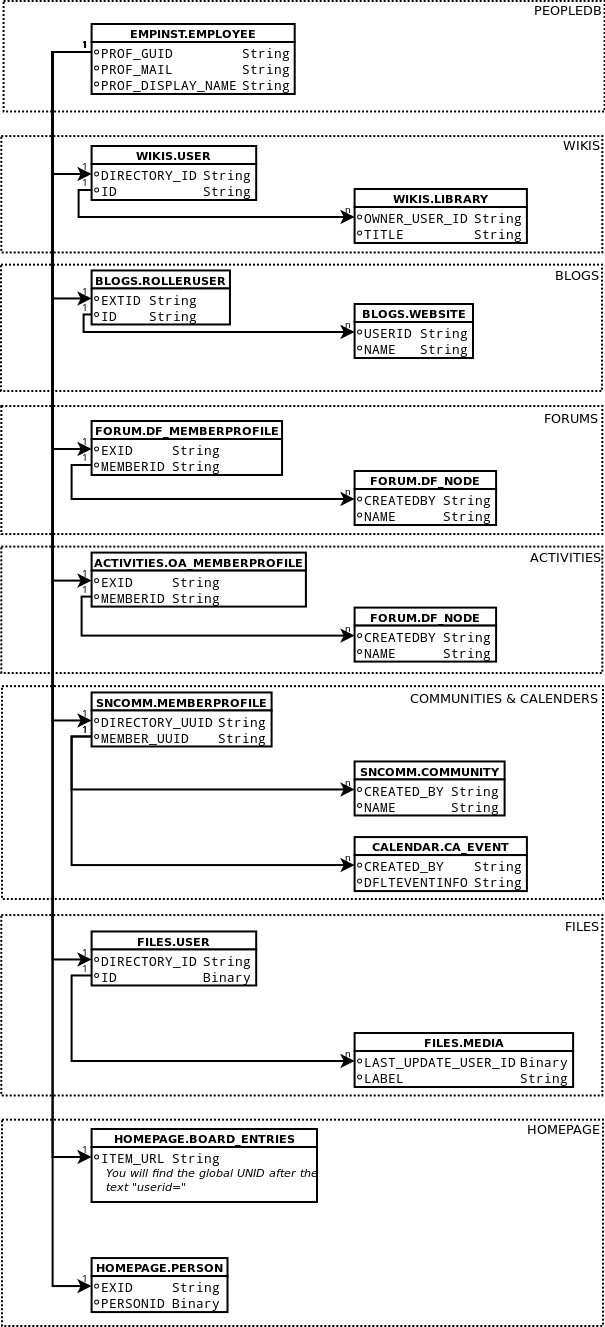
So I thought a little database relationship diagram would help make life a bit easier, the core of everything is the EMPLOYEE table in the PEOPLEDDB as that is where the global profile ID is generated for each person, you then have to find where that is mentioned in each of the applications individual member tables, from there you can use that to work out actually what that user has done in the system, thankfully most of the individual application database’s use the same sort of text identifier so they don’t cause a problem once you know they exist, the 2 exceptions are the FILES database which uses an IBM binary format (goodness know why, I’m guessing that it makes sense to use one for the files them selves and they were trying to be consistent within the FILES application) and the HOMEPAGE application in which the UNID is hidden inside a text string which you have to parse.

I will keep this diagram up to date, but please yell if you need more.

this diagram works equally well on both v4 and v4.5


NOTE: All these tips are not officaliy sanctioned by IBM as they do not release DB schema info to the public, so you use them at your own risk, Also if IBM are reading this and I either have somthing wrong or you have documented this for the public, then please tell me and I will correct 🙂

NOTE: I’m not a proper Connections / Web Sphere admin, If you want proper Web Sphere and Connections admin you want the Turtle Partnership


New Anime Series: Captain Earth

First Episode(s) Review for: Captain Earth
Summary:

The death of his astronaut farther has a detrimental effect on a teenagers life, meaning he is withdrawn despite being quite skilled and popular, when a huge floating rainbow ring appears in the sky he is drawn back to the place in his childhood where he first saw it, oh and chuck in a space princess in a giant pink mecha.

Animation:

Slightly toned down cell animation (the sort they use when try to achieve realism without putting a lot of effort into detail) totally watchable.

Plot Potential:

So what looks at first to be a simple “boy finds secret life in space” starts to look a lot deeper than you would expect, with a lot more threads already coming into play, defiantly not a background series (some people who I thought were good guys already turned into bad guys within 15 mins)

Music:

Moving but not catchy, sounds like they have plundered NASA’s dramatic music store

Reminds me of:

Hard to say really, but you know those series that have a group of children going into an old temple when they are young and it going back to bite them then they are older? That but in space, I suppose like a slow moving and serious Tenchi Muyo!

Overall:

Even though this is a standard plot line, I really enjoyed the variants in it, the hero is not a d**k which always helps and one wonderful old school bonus, the giant machine transformations are truly ridiculous, there is more “clunk clinking” than talking in the first episode, this is a series to watch (and pull the odd Dragon ball Z pose too)


Disclaimer: These are mini reviews of anime’s that are fresh out in Japan and are not licensed in the UK, buy them once they have been licensed or at the very least buy the merchandise, remember if the anime makers make a loss, THEY WILL STOP MAKING ANIME!!

Working from anywhere

I was taught by Mr Ben Poole that a good contractor should leave his desk empty and clean at the end of each day, and watched how Gab Davis seems to be able to work from anywhere at a moments notice so I have been trying for some time to manage both things.

As normal I have not quite got the hang of the simple part, and given the small nature of my studio flat where I do most of my from home working I have tried to pack my whole office into one bag but it does have a few advantages

  • I don’t mind working anywhere as I have no ‘homebase’ as such.
  • I can always give my all at a clients site as I will never be lacking anything
  • I don’t mind doing less than a day at a clients as I can just get on with other stuff

This all works well for me as I enjoy people’s company and do my best work in a busy environment. so I though I might share what I carry in addition to a the real basics: a Laptop (Thinkpad W510), Phone (Nexus 5) and headphones (Sennheiser 550-X)


Core Stuff

  • The silent and powerful USB fan from Thermaltake, saved me from misery in many an over hot office.
  • In my opinion the best mouse in the world the Logitech M570
  • Baby TPLink 150Mbps Wireless N Nano Router , USB powered and perfect for sites where they may not have a desk setup for you, you can just plug this in and you are up and running.
  • Bloody huge Thinkpad charger, weighs a sodding ton, but can be used as a ball and chain in those tricky meetings.
  • At last a proper retractable and collapsible UK power cable this one by ReTrak
  • Western digital Elements Portable HDD inside its Caselogic case a more reliable and essential paring I have yet to see
  • Anker portable USB 15000mAh battery + the lovely smaller version provided by Panagenda
  • Decent 2Amp USB charger any brand is fine, but this one is from Lenovo
  • Torch: present from Matt White (for some late night working) + spare batteries (including ones for my headphones)


Abroad and in the dark

  • Eagle Creek bag to store everything from all the pictures in (they also supply the small bag in the next image)
  • The awesome GoalZero Luna LED light
  • Skross World Adaptor Pro+ which is by far and away the best socket adaptor I have found, both in terms of amperage it can take and the fact it is earthed.
  • Lenovo Travel charger + its thousands of cables and adaptors
  • Various adaptors: Euro to US, kettle lead to figure of eight and vs versa


Little Bag

  • 5 USB cables of various lengths
  • 2 USB OTG adaptors so that I can plug things like keyboards and usb sticks into my phone/tablet
  • Mini USB hub
  • SIM adaptor and tool (in case of phone dieing at a critial time)
  • USB Sticks
  • Audio adaptor cables for my Sennheiser 550-X bluetooth headphones
  • Lindy retractable Ethernet cable, this may look big but its nice and long and most importantly it protects the little clips from being broken which happened to its 2 predecessors
  • Spare mouse by Swiftpoint
  • Spare headphones


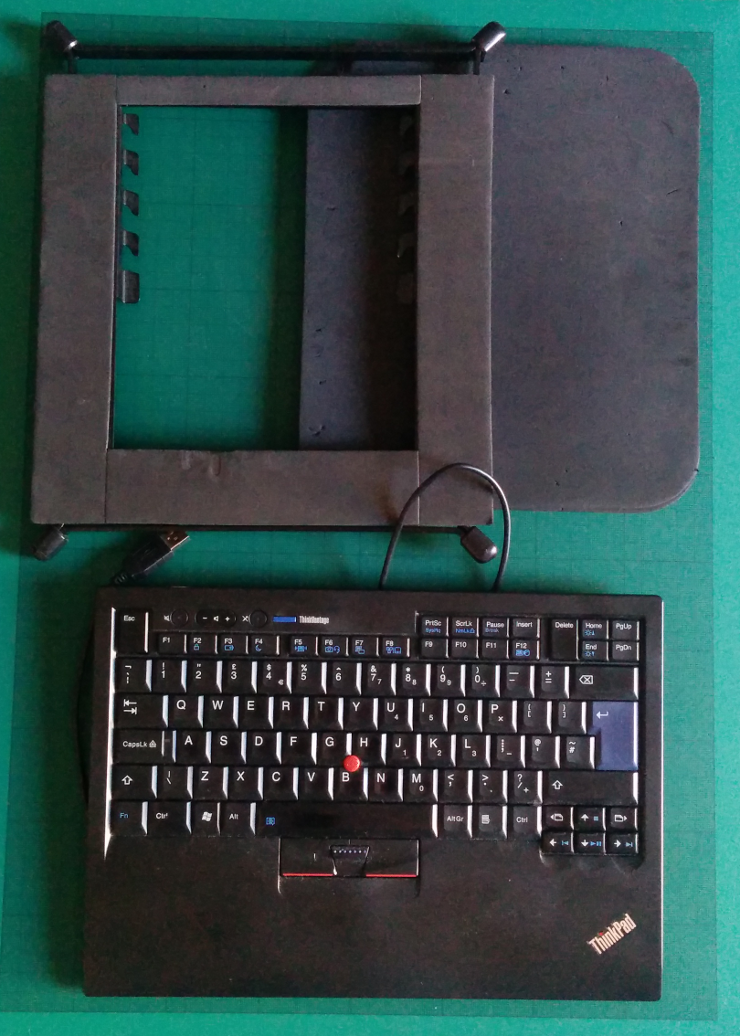
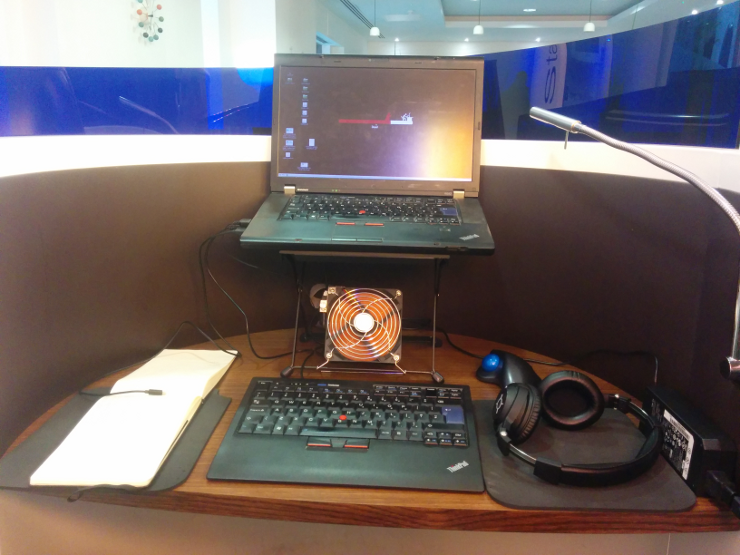
One thing that people tease me about with my setup but frankly I simply could not do without is my Magma laptop Riser, this combined with a USB version of the ThinkPad Keyboard and a couple of mouse pads as arm rests mean I get to have the top third of my laptop’s screen at my sitting eye level which is how its supposed to be.

What do I carry all of this in?

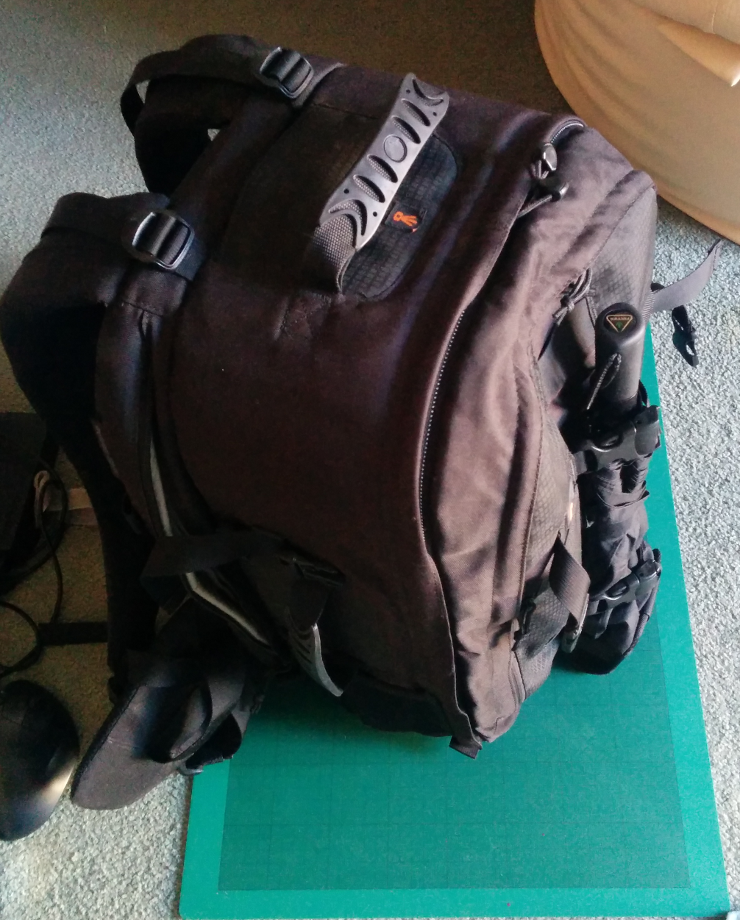
After the destruction of many brands of rucksack including the Wenger backpacks that everybody else swears by, I have finally settled on the Lowepro pro runner 450aw which while rather large means I can carry everything I want and JUUUSSST get it on a plane as carry on (its right on the limit), if I’m travelling on a budget airline I use a Lowepro Fastpack 350 which always fits.


And here is how it looks when I’m all setup ( in this case at a Regus Office near a client at Bank station London )


Of course in addition to this I carry pens, pad, spork, small flask, umbrella and the usual ‘man bag’ stuff, but that was all boring

New Anime Series: Dragon Collection

First Episode(s) Review for: Dragon Collection
Summary:

Young and gutsy boy is pulled into a new video game only to find him self in the real world of said video game, there he saves a defenceless animal who turns out to have great power that comes out when the lad gets drawn into a card duel (dear lord I could just copy and paste this summery is been used so many times)

Animation:

Saturday morning bright and shiny animation, well nicely done, very obviously drawn straight over static back grounds (yes I know nearly all animation is like that but this is quite blatant), its the kind of animation that the other members of the household love.

Plot Potential:

Well its another card game anime, with exactly the plot flow you would expect, as long as you are happy with that you can sit back and enjoy it.

Music:

bouncy bouncy, fun fun fun fun

Reminds me of:

More Monster Rancher than Pokemon and looks more like a version of Magic Knight Rayearth aimed at boys than either of them

Overall:

You never know with these merchandise based anime if they will go the the distance as they are so closely tired to the success of the product they are selling, but while not want I would call gripping , this is the kind of thing I would have loved as a 12 year old lad on Saturday morning and to be fair its still lots of fun and a stress free way to spend 24 mins.


Disclaimer: These are mini reviews of anime’s that are fresh out in Japan and are not licensed in the UK, buy them once they have been licensed or at the very least buy the merchandise, remember if the anime makers make a loss, THEY WILL STOP MAKING ANIME!!

Connections Db Tip1: getting the Connections db Schema version

One of the many little bundles of joy when dealing with back end SQL code on ‘living’* application such as IBM Connections, is that SQL that may have worked for one version or service pack might not work for another

To cater for this you might have to write for or at least be able to handle the diferent versions of a database, when doing this you tend not to use the actual product version ie “Connections 4.5.0.0.” but the db schema number for each database, thankfully IBM store the db schema for each database in Connections (though not with a great deal of consistency), the following is the SQL to get this for each of the databases that make up connections.

Connections App: Files

BD: FILES

Table: PRODUCT

Connection v4.5 Base Schema Number: 82

SQL to get Schema

SELECT SCHEMA_VERSION FROM "FILES"."PRODUCT";

***
#####Connections App: Activities
_BD:_ OPNACT

_Table:_ OA_SCHEMA

_Connection v4.5 Base Schema Number:_ 56
SQL to get Schema

SELECT DBSCHEMAVER FROM "ACTIVITIES"."OA_SCHEMA";

***
#####Connections App: Blogs
_BD:_ BLOGS

_Table:_ ROLLER_PROPERTIES

_Connection v4.5 Base Schema Number:_ 51
SQL to get Schema

SELECT DBMS_LOB.substr(VALUE, 3000) FROM "BLOGS"."ROLLER_PROPERTIES" where NAME = 'database.schema.version';

_Notes:_ The rotten sods have stored it as a “Clob” data format (basically Binary) so the SQL is a bit more complex.
***
#####Connections App: Communities
_BD:_ SNCOMM

_Table:_ SNCOMM_SCHEMA

_Connection v4.5 Base Schema Number:_ 77
SQL to get Schema

SELECT DBSCHEMAVER FROM "SNCOMM"."SNCOMM_SCHEMA";

***
#####Connections App: Community Events
_BD:_ SNCOMM

_Table:_ CA_SCHEMA

_Connection v4.5 Base Schema Number:_ 15
SQL to get Schema

SELECT DBSCHEMAVER FROM "CALENDAR"."CA_SCHEMA";

***
#####Connections App: BookMarks
_BD:_ DOGEAR

_Table:_ DOGEAR_SCHEMA

_Connection v4.5 Base Schema Number:_ 15
SQL to get Schema

SELECT DBSCHEMAVER FROM "DOGEAR"."DOGEAR_SCHEMA";

***
#####Connections App: Forums
_BD:_ FORUM

_Table:_ DF_SCHEMA

_Connection v4.5 Base Schema Number:_ 27
SQL to get Schema

SELECT DBSCHEMAVER FROM "FORUM"."DF_SCHEMA";

***
#####Connections App: HomePage , News, Search
_BD:_ HOMEPAGE

_Table:_ HOMEPAGE_SCHEMA

_Connection v4.5 Base Schema Number:_ 210
SQL to get Schema

SELECT DBSCHEMAVER FROM "HOMEPAGE"."HOMEPAGE_SCHEMA";

***
#####Connections App: Metrics
_BD:_ METRICS

_Table:_ PRODUCT

_Connection v4.5 Base Schema Number:_ 34
SQL to get Schema

SELECT SCHEMA_VERSION FROM "METRICS"."PRODUCT";

***
#####Connections App: Mobile
_BD:_ MOBILE

_Table:_ ROLLER_PROPERTIES

_Connection v4.5 Base Schema Number:_ 1
SQL to get Schema

SELECT VALUE FROM "MOBILE"."ROLLER_PROPERTIES" where NAME = 'database.schema.version';

***
#####Connections App: Profiles
_BD:_ PEOPLEDB

_Table:_ SNPROF_SCHEMA

_Connection v4.5 Base Schema Number:_ 36
SQL to get Schema

SELECT DBSCHEMAVER FROM "EMPINST"."SNPROF_SCHEMA";

***
#####Connections App: Wiki
_BD:_ WIKIS

_Table:_ PRODUCT

_Connection v4.5 Base Schema Number:_ 82
SQL to get Schema

SELECT SCHEMA_VERSION FROM "WIKIS"."PRODUCT";

***

*By living I mean ‘the feckers keep changing them’
_NOTE: All these tips are not officaliy sanctioned by IBM as they do not release DB schema info to the public, so you use them at your own risk, Also if IBM are reading this and I either have somthing wrong or you have documented this for the public, then please tell me and I will correct_ 🙂
_NOTE: I’m not a proper Connections / Web Sphere admin, If you want proper Web Sphere and Connections admin you want [the Turtle Partnership](http://www.turtleweb.com/)_