Listen while you work

As I might have mentioned before, I like company when I work or at least the background drone of an active office, it turns out that this noise is good for you as studies such as this one from the Journal of Consumer Research state, this is currently breeding a whole pack of apps that generate this kind of noise such as http://coffitivity.com/

Now this is all just telling IT staff what they have known for years, and anyone that has watched productivity and staff retention plummet due to a petty manager banning headphones will be able to attest to the advantages of a none “silent as the grave” working environment.

Over the years I have built up my own bank of favourite audio media, which have in the last year or two moved solidly to my phone, I though I would share

Music

Most of my music comes from http://www.di.fm/ the most amazing site for digital music (I have been a member since April 2005), they have a huge range of channels for the different styles of electronic music with excellent web and native mobile app players.

Favourite Channels

This is supplemented by Spotify though I have learnt not to rely on a track or artist permanently staying on the platform, to this end I tend to use Spotify as a discovery platform then go buy the DRM free music from amazon

The BBC IPlayer is not just for music but holds a full week of BBC radio, it is really worth installing and regaining access to all those stations we lost when we stopped being near a radio, though I suspect if you are not from the UK you are out of luck (Americans this is how were feel all the time so tough)

Podcasts

Podcasts are my staple access to current news

Constant listens

Other Recommends

  • Mahabharata Podcast – an excellent English language re-telling of the ancient epic.
  • German pod 101 – very very good language pod-cast (variations for all major languages)

For Android my podcast client recommendation is Doggcatcher feature and usability wise I have found it just cant be beat.

Audio Books†

I have loved these since my very first one in 1981 “2 ADVENTURES OF THE SECRET SEVEN read by Roy Castle” and they fill a large part of my culture gap. now-a-days Audible (or rather Amazon) has pretty much nailed this market down with their fab app.

However while Audible is great, the content providers are as normal being a pack of arses with 81983 unabridged titles on the UK site vs 111016 on the US site, I have even phoned up Audible UK to ask about this and they are no more happy about it than we are, so Audible is not the be-all and end-all of Audio books if they don’t have something keep looking.

In addition some of the best narration was done ages ago and the companies that supplied these books to libraries (back when audio books were mainly for the sight impaired, elderly or dyslexic) have still not moved these masterpieces to the modern world so you might want to have a hunt around off line for some classics.

My personal recommendation for a Android player for Audio books is Music Folder Player it’s very well behaved, plays all sorts of files, has things like sleep timer and such but most important plays files by OS details (file name, folder etc etc) rather than ID tags)

There we go hope that provided a moments amusement


† As many of my clients read my blog and other social media, I will point out that I tend to not listen to audio books while working, as they are kind of distracting, I tend to listing to them during beak (to give my eyes a rest) and while travelling

New Anime Series: Brynhildr in the Darkness

First Episode(s) Review for: Brynhildr in the Darkness
Summary:

A thoughtful teenager thinking back on mistakes he thinks he has made in his life (though I think he is being really hard on him self) has to deal with all sorts of strangeness when those mistakes come back to haunt him in the shape of a girl he KNOWS is dead

Animation:

Most of it is plain if not drab cell animation, but its given a lot of effects to highlight the plot such as greying everything out apart from a point of interest or oil paint rendering of stop scenes.

Plot Potential:

The plot is a good serious one and for once I don’t seem to be able to tell where it is going, there are a lot of mysterious hints but by the end first episode you just don’t know for sure what the crux of the plot is going to be, the oily irritant is the opening credits which while awesome are at this stage a huge spoiler (skip if you can bare it)

Music:

“Good guys walking into spooky alien s**t” type music for a good opening tune, as if daft punk did the x-files theme. closing theme is nothing much.

Reminds me of:

A bit of Elfen Lied a bit of Occult Academy

Overall:

The opening credits for this Anime are fecking awesome, sent tingles down my spine with anticipation, and I am pleased with a slow moving plot for a change (its always such a shame when they have to put ‘hooks’ in early episodes rather than letting it develop normally) , but there is enough meat for me to hope for a gripping series.


Disclaimer: These are mini reviews of anime’s that are fresh out in Japan and are not licensed in the UK, buy them once they have been licensed or at the very least buy the merchandise, remember if the anime makers make a loss, THEY WILL STOP MAKING ANIME!!

SQuirrel SQL For IBM Connections

With the latest version Db2 (version 10.X) the native SQL client db2cc has been removed so you now need a separate SQL client for your admin work, this is a real ball ache, but something that us developers have been putting up with for ages, so I thought I would do a quick guide to install a nice SQL client for connections.

My recommendation for this is http://squirrel-sql.sourceforge.net/

why?

  • Been around for ages so well respected (even die hardened DBAs will acknowledge that your choice is not terrible)
  • FREE
  • Small footprint (just needs Java and you will already have that if you are doing connections dev/admin)
  • hellishly powerful
  • Uses IBM’s own jar files.
  • works on Win / Mac / Linux

There are tons of other options of course most, developers will be familiar with Eclipse SQL as that is the most common plug in for eclipse, where as some admins prefer Toad or IBM Data Studio

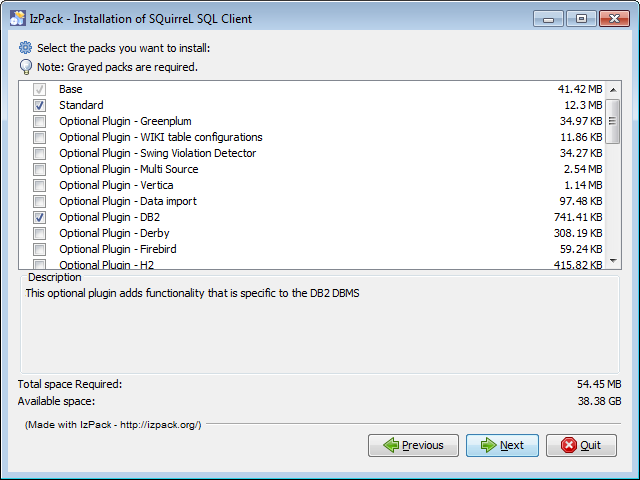
Once you have downloaded and run the install Jar you will only find one option worth mentioning, and that is to install the IBM DB2 option (just a tick box)


Everything else is just either next or picking the install directory

When you first open it you will get a screen like this


Click on the big “Drivers” button on the left hand side, and scroll down till you see “IBM DB2 App Driver” entry, you will see that like nearly all the other entries, it has a red X by it,


Now Double Click on the entry and in the pop up box, move to the “Extra Class Path” Tab


Next click on the “Add” button and go hunting for the driver Jar files, these are best to get of the DB2 server, they are:

db2jcc.jar

db2jcc_licence_cu.jar

and you will tend to find them in the directory

X:Program FilesIBMSQLLIBjava

where ever you have installed the db2 server

Once you have added them, change the “Class Name” drop down to

com.ibm.db2.jcc.DB2Driver


That’s you driver sorted, now make some connections

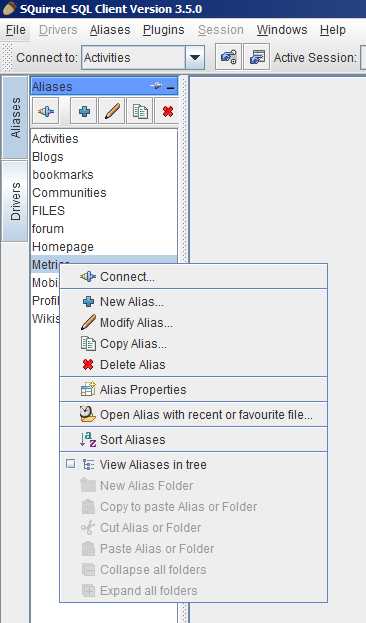
Click on the “Aliases” button then the “+” button to add a new Aliases


Select the driver you just setup, from the drop down field

Then in the URL field put the connection string for the database you want to get to in the format

jdbc:db2://XXX.XXX.XXX.XXX:50000/XXXX (port 50000 is the default port for db2)

for example

jdbc:db2://localdb2.ldc.com:50000/BLOGS

will get me the blogs database on my local server

for extra info here is the list of all the databases for the different connections Apps

Connections App: Files, DataBase: FILES

Connections App: Activities, DataBase: OPNACT

Connections App: Blogs, DataBase: BLOGS

Connections App: Communities, DataBase: SNCOMM

Connections App: Community Events, DataBase: SNCOMM

Connections App: BookMarks, DataBase: DOGEAR

Connections App: Forums, DataBase: FORUM

Connections App: HomePage , News, Search, DataBase: HOMEPAGE

Connections App: Metrics, DataBase: METRICS

Connections App: Mobile, DataBase: MOBILE

Connections App: Profiles, DataBase: PEOPLEDB

Connections App: Wiki, DataBase: WIKIS

Then just use enter the username and password (hint, you will NEVER get the lsuser account off your admin)

and click “OK”


You now have an alias that you can double click to connect to the specified database, you are going to have to create one for each of the Connections databases 🙁 , but you can make things easier by right clicking on a alias and copying it so you only have to make changes rather than start again.


But it does seem a a pain to make everybody do this full setup, you can cheat even more by copying the SQLAliases23.xml file (it’s normally in a hidden directory in the users home drive but varies according to the operating system) and using it to replace the one on your target PC, all the aliases will then appear already setup.

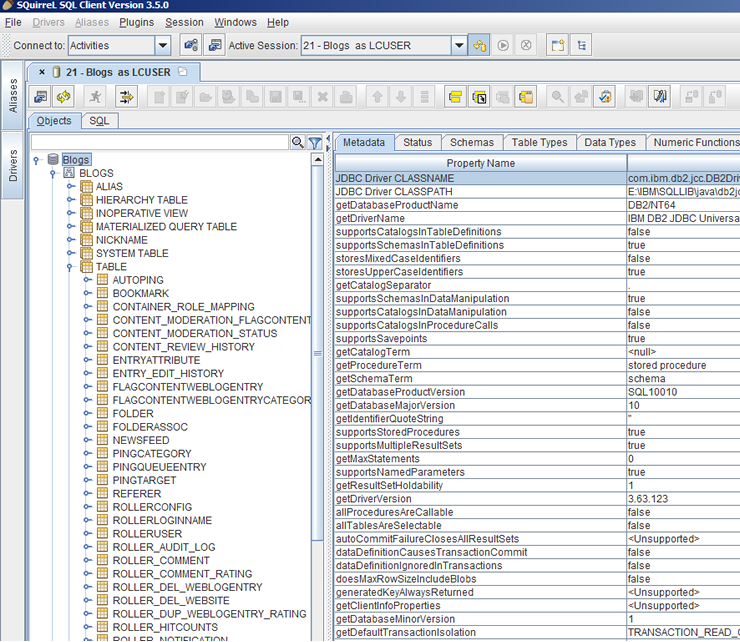
Finally before this turns into a Squirrel sql manual, you can double click each of the aliases and not only see the database tree and gain access to the tables, but run SQL queries via the SQL tab at the top of the screen just under the normal menus.


Have Fun!!

NOTE: I’m not a proper Connections / Web Sphere admin, If you want proper Web Sphere and Connections admin you want the Turtle Partnership