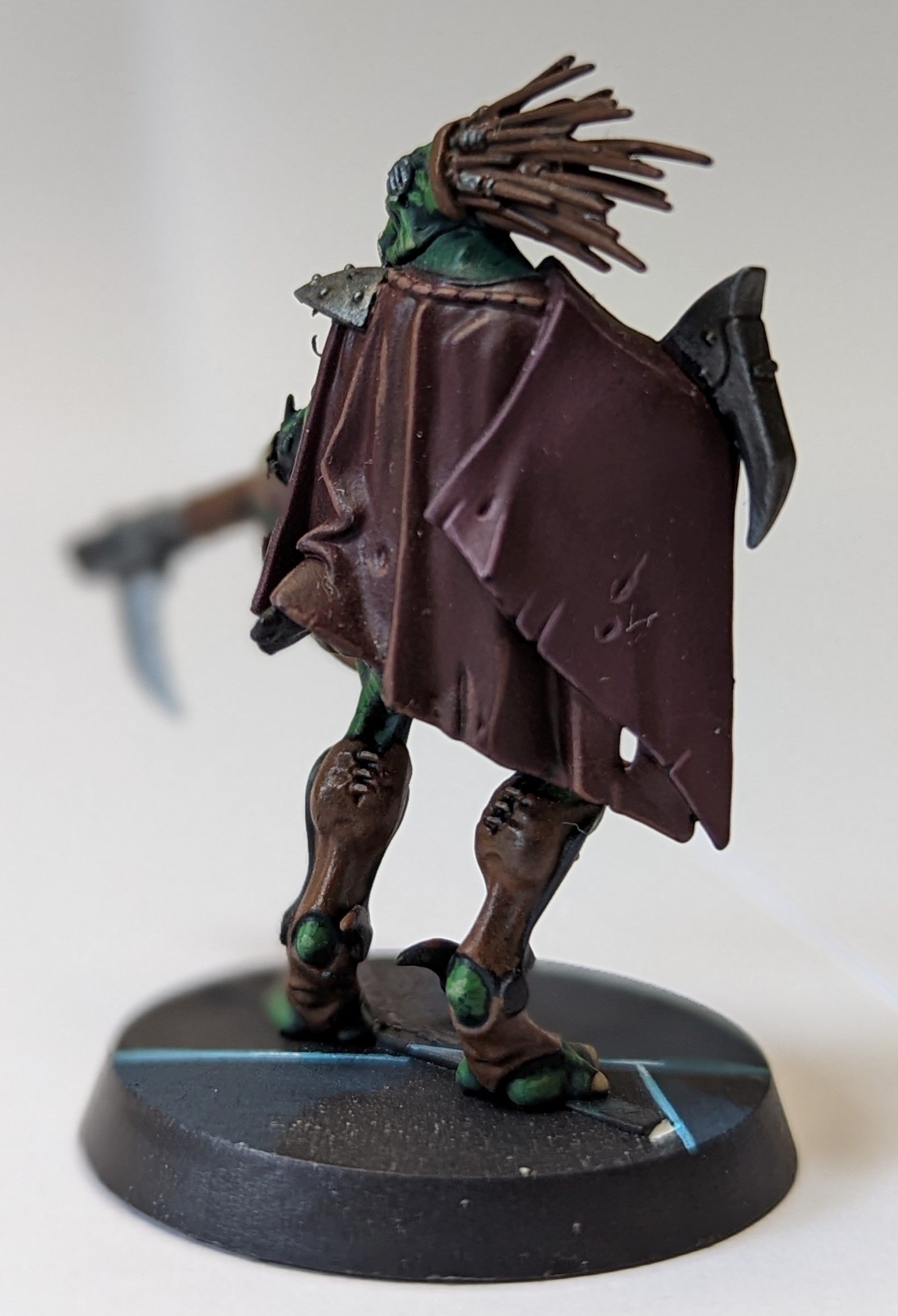
Painting Guide – Blackstone Fortress: Dahyak Grekh

Painter: Dultoriminis

Model(s): Main Blackstone Fortress original box.

Paint(s): Chaos Black spray, Caliban Green, Ogryn Camo , Retributor Armour, Leadbelcher, Rhinox hide, Mornfang Brown, Skrag Brown, Screaming Skull, Screamer Pink, White Scar, Nuln Oil, Agrax Earthshade

Method(s):

Base: Chaos Black spray.

Skin: base Caliban Green, wash Nuln Oil, mix Caliban Green 1:1 with Ogryn Camo, paint over skin with the exception of any recesses, highlight with Ogryn Camo.

Claws: Screaming Skull, wash Agrax Earthshade,

Leather: base Rhinox hide, wash Agrax Earthshade, layer with Mornfang Brown, and highlight with Skrag Brown

Steel: base Leadbelcher, wash Nuln Oil, highlight with Leadbelcher

Cape: Base Screamer Pink, wash Agrax Earthshade, layer Screamer Pink avoiding dark recesses, mix White Scar and Screamer Pink 1:1 for highlights.

NOTE: Retributor Armour on any trim you decide on for either leather or steel.

Paint Time: 4 hours


Painting Guide – Greater Possessed

Painter: Dultoriminis

Model(s): Space Marine “Start Collecting” Box (out of print)

Paint(s): Chaos Black Spray, Bugmans Glow, Cadian Fleshtone, Druchi Violet shade, Zandri Dust, Agrax Earthshade, Ushabti Bone, Screaming Skull, Abaddon Black, Dark Reaper, Fenrisian Grey, Leadbelcher, Retributor Armour

Method(s): Spray model Chaos Black for base coat

Armour: Start with a 1:1 mix of Abaddon Black and water, then cover the whole model, as mentioned in other posts this is so if we need to do any corrections we have the right black as the finish, as Abaddon Black and Chaos Black are slightly different. next highlight all the black armour with Dark Reaper, I would also recommend leaving a small gap between the gold tip and highlighting along these parts to add more contrast to the black. Lastly a fine highlight over the Dark Reaper of Fenrisian Grey.

Skin: Base Bugmans Glow, next mix Bugmans Glow and Cadian Fleshtone 1:1 and layer leaving all but the darkest recesses, highlight Cadian Fleshtone, wash with Druchi Violet, once dry, do a second wash in the recesses, this will give the grim bruised and sore looking skin, finally highlight once again with Cadian Fleshtone.

Bone: Base Zandri Dust, wash Agrax Earthshade, layer leaving darkest recesses with Ushabti Bone, wash with Agrax Earthshade, highlight with Screaming Skull.

Trim: Base gold trim with Retributor Armour, wash Agrax Earthshade.

Steel/metal bits: Base Leadbelcher and wash with Agrax Earthshade.

Paint Time: 4-6 hours

Notes: Take your time with the skin, this is what draws the eyes attention. as long as you get that right the model will look great.


Saleforce Same Code Different Triggers

In Salesforce the same bit of code can be triggered a lot of different ways and with calls to third parties there are different rules for the different ways of calling stuff.

For example take this bit of code, in it we are just passing a contact ID and it is going to go and talk to a third party web service, inside the “setUpRequest” it’s going to update the third party with the details of the Salesforce Contact and in return recive some bits and bobs from the third party to update the Saleforce side. Basic syncing between two parties

public class BlogFramework {
    public Static Void UpdateContactFromExternalWebService(String contactID) {
                Http h = new Http();
                HttpRequest request = setUpRequest(contactID);
                HttpResponse response = h.send(request);
    }           
}


we want this thing to happen at two different times:

1. When a user manually updates a contact and then just saves it: we want the sync to happen instantly so the user can see immediately what’s happened and what’s been updated.

2. On schedule: The content might not be updated in Salesforce at all, all changes might happen in the third party but the details still have to be kept up to date for reports and views etc.
So this bit of code has to be callable both from a Schedule and from a save Trigger

let’s take the save trigger first, as it is now it won’t work, you will get the error “Callout from triggers are currently not supported.” error if you try, normally you would just pop the annotation “@Future(callout=true)”1 at the top of this function and that would solve that but as you will see later on we can’t do that so what we’re going to do is have a little wrapper function that has the @future annotation and from that it’s going to call are real function.

@Future(callout=true)
public Static Void UpdateContactFromExternalWebServiceTrigger(String contactID) {
        BlogFramework.UpdateContactFromExternalWebService(contactID);
}   


we can then put that wrapper functions in our contact save trigger and everything will work perfectly

trigger ContactTriggerAllEvents on Contact (
    before insert,
    before update,
    //before delete,
    after insert,
    after update
    //after delete,
    //after undelete
    ) 
    {
        for(Contact cnt:Trigger.new)
        {
            BlogFramework.UpdateContactFromExternalWebServiceTrigger(cnt.ID); 
        }        
    }


Next comes calling it from a schedule, if we had put the @future annotation on the actual function this would fail because you cannot call a future function from a scheduled action but we dont have that issue now, what you DO have to do is bolt-on the “Database.AllowsCallouts” to your batch object as seen below

global class UpdateFromAzpiral implements Database.Batchable<sObject>, Database.AllowsCallouts{
    // Get all the contacts
    global Database.QueryLocator start(Database.BatchableContext BC){
        return Database.getQueryLocator([SELECT Id FROM Contact]);
    }
    // The executeBatch method is called for each chunk of objects returned from the start function.
    global void execute(Database.BatchableContext BC, List<Contact> scope){
      for(Contact c : scope){
         BlogFramework.UpdateContactFromExternalWebService(c.ID);
      } 
    }
    //The finish method is called at the end of a sharing recalculation.
    global void finish(Database.BatchableContext BC){
    }
}


Now your batch object will be allowed to do callouts.
Putting all these bits together means you can have a single function that calls out to third parties that can be triggered from either a Schedule or an ordinary Trigger.

  1. The “@Future(callout=true)” annotation basically means that the salesforce code does not stop and wait before doing other things this means that calls to third parties does not slow down the salesforce UI.[]

Unlimited Test Email Addresses

A silly tip that has saved me tons of hours and make clients happy is having an Email domain that has “catch-all” routing on it.

Basically this is having a domain that any address that you use with it automatically routes to a central email address, mine is the “energywins.co.uk” domain, anything you send to that domain ends up at my main address, be it “clientTest1@energywins.co.uk” or “fakeUser200@energywins.co.uk”, this did not used to be that useful when all apps were internal, but in the world of cloud apps and PARTICULARLY with the Salesforce/Pardot world that only allows an email to be registered once it is invaluable and helps you to keep clients separated (they also love to have you use emails address that are specific to them ie “MicrosoftTEST@energywins.co.uk”

This can be done easily with just about any email provider, but I use Gmail for domains as it is easy, fast and cheap1.

Strangely the Gmail for Domain instructions keep changing, are oddly poor for Google and the setting is buried REALLY deep which I assume means they don’t really want you to do it. so if things change, just search for “Gmail Catch All” in the meantime:

  • From your inbox, Click on the little cog on the right-hand side and select “Manage this Domain”

  • Then select “Apps”

  • Then select “G Suite”

  • Then select “Gmail”

  • Then scroll down to the bottom and select “Advanced Settings”

  • Then scroll nearly down to the bottom and under “Routing” you will see the setting for “Email routing”, change the radio button for “Unknown mailbox account messages” to “Route to catch-all address”, and put in your main email address for this domain.

That’s it, for most people this is not a suitable setting because it just slightly increases your spam content, but for me and anyone who needs a constant stream of individual email address and to not lose track of old ones used one 6 months ago, it’s invaluable.

  1. Some of my colleges use temp email domains such as http://www.throwawaymail.com but I have found that such things have a habit of being needed again in 6 months when the client comes back for more work.[]