Living Document: Connections Db Schema Versions

This page is just a living reference for thoese of us using the connections databases directly who want to make sure our code works by checking the db schemas before performing actions, you can see how to get these values in a previous post

If IBM would like to document this themselves (I know they wont as they dont want us near the dbs directly and want us to go via the APIs) I would be happy to bow out and point to their site 🙂

Connections App: Files

BD: FILES

Table: PRODUCT

Connections v4.0 BASE: 79

Connections v4.0 CR1: 79

Connections v4.0 CR2: 79

Connections v4.0 CR3: 79

Connections v4.0 CR4: 79

Connections v4.5 BASE: 82

Connections v4.5 CR1: 82

Connections v4.5 CR2: 82

Connections v4.5 CR3: 89

Connections v4.5 CR4: 89


Connections App: Activities

BD: OPNACT

Table: OA_SCHEMA

Connections v4.0 BASE: 53

Connections v4.0 CR1: 53

Connections v4.0 CR2: 53

Connections v4.0 CR3: 53

Connections v4.0 CR4: 53

Connections v4.5 BASE: 56

Connections v4.5 CR1: 56

Connections v4.5 CR2: 56

Connections v4.5 CR3: 56

Connections v4.5 CR4: 56


Connections App: Blogs

BD: BLOGS

Table: ROLLER_PROPERTIES

Connections v4.0 BASE: 43

Connections v4.0 CR1: 43

Connections v4.0 CR2: 43

Connections v4.0 CR3: 43

Connections v4.0 CR4: 43

Connections v4.5 BASE: 51

Connections v4.5 CR1: 51

Connections v4.5 CR2: 51

Connections v4.5 CR3: 51

Connections v4.5 CR4: 51


Connections App: Communities

BD: SNCOMM

Table: SNCOMM_SCHEMA

Connections v4.0 BASE: 76

Connections v4.0 CR1: 76

Connections v4.0 CR2: 76

Connections v4.0 CR3: 76

Connections v4.0 CR4: 76

Connections v4.5 BASE: 77

Connections v4.5 CR1: 77

Connections v4.5 CR2: 77

Connections v4.5 CR3: 77

Connections v4.5 CR4: 77


Connections App: Community Events

BD: SNCOMM

Table: CA_SCHEMA

Connections v4.0 BASE: 10

Connections v4.0 CR1: 10

Connections v4.0 CR2: 10

Connections v4.0 CR3: 10

Connections v4.0 CR4: 10

Connections v4.5 BASE: 15

Connections v4.5 CR1: 15

Connections v4.5 CR2: 15

Connections v4.5 CR3: 15

Connections v4.5 CR4: 15


Connections App: BookMarks

BD: DOGEAR

Table: DOGEAR_SCHEMA

Connections v4.0 BASE: 14

Connections v4.0 CR1: 14

Connections v4.0 CR2: 14

Connections v4.0 CR3: 14

Connections v4.0 CR4: 14

Connections v4.5 BASE: 15

Connections v4.5 CR1: 15

Connections v4.5 CR2: 15

Connections v4.5 CR3: 15

Connections v4.5 CR4: 15


Connections App: Forums

BD: FORUM

Table: DF_SCHEMA

Connections v4.0 BASE: 21

Connections v4.0 CR1: 21

Connections v4.0 CR2: 21

Connections v4.0 CR3: 21

Connections v4.0 CR4: 21

Connections v4.5 BASE: 27

Connections v4.5 CR1: 27

Connections v4.5 CR2: 27

Connections v4.5 CR3: 27

Connections v4.5 CR4: 27


Connections App: HomePage , News, Search

BD: HOMEPAGE

Table: HOMEPAGE_SCHEMA

Connections v4.0 BASE : 110

Connections v4.0 CR1 : 110

Connections v4.0 CR2 : 132

Connections v4.0 CR3 : 132

Connections v4.0 CR4 : 132

Connections v4.5 BASE: 210

Connections v4.5 CR1 : 210

Connections v4.5 CR2 : 210

Connections v4.5 CR3 : 211

Connections v4.5 CR4 : 213


Connections App: Metrics

BD: METRICS

Table: PRODUCT

Connections v4.0 CR2: 29

Connections v4.0 CR1: 29

Connections v4.0 CR2: 29

Connections v4.0 CR3: 30

Connections v4.0 CR4: 30

Connections v4.5 BASE: 34

Connections v4.5 CR1: 34

Connections v4.5 CR2: 37

Connections v4.5 CR3: 37

Connections v4.5 CR4: 37


Connections App: Mobile

BD: MOBILE

Table: ROLLER_PROPERTIES

Connections v4.0 BASE: 1

Connections v4.0 CR1: 1

Connections v4.0 CR2: 1

Connections v4.0 CR3: 1

Connections v4.0 CR4: 1

Connections v4.5 BASE: 1

Connections v4.5 CR1: 1

Connections v4.5 CR2: 1

Connections v4.5 CR3: 1

Connections v4.5 CR4: 2


Connections App: Profiles

BD: PEOPLEDB

Table: SNPROF_SCHEMA

Connections v4.0 BASE: 33

Connections v4.0 CR1: 33

Connections v4.0 CR2: 33

Connections v4.0 CR3: 33

Connections v4.0 CR4: 33

Connections v4.5 BASE: 36

Connections v4.5 CR1: 36

Connections v4.5 CR2: 36

Connections v4.5 CR3: 36

Connections v4.5 CR4: 36


Connections App: Wiki

BD: WIKIS

Table: PRODUCT

Connections v4.0 BASE: 79

Connections v4.0 CR1: 79

Connections v4.0 CR2: 79

Connections v4.0 CR3: 79

Connections v4.0 CR4: 79

Connections v4.5 BASE: 82

Connections v4.5 CR1: 89

Connections v4.5 CR2: 89

Connections v4.5 CR3: 89

Connections v4.5 CR4: 89


NOTE: All these tips are not officaliy sanctioned by IBM as they do not release DB schema info to the public, so you use them at your own risk, Also if IBM are reading this and I either have somthing wrong or you have documented this for the public, then please tell me and I will correct 🙂

NOTE: I’m not a proper Connections / Web Sphere admin, If you want proper Web Sphere and Connections admin you want the Turtle Partnership
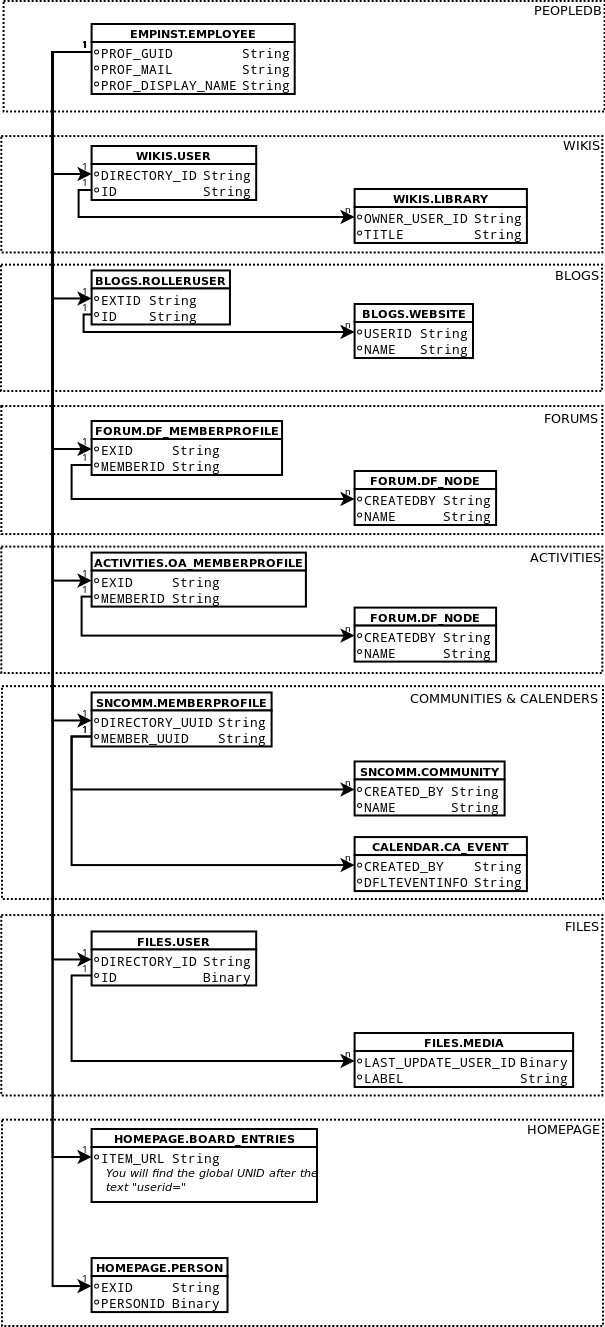
Connections Db Schema Tip2: Finding the UserID

Anyone who has had a dig around inside the back end SQL databases (or even compared a number of the ATOM feeds) for IBM Connections will have realised that ID’s are not a constant across the whole of Connections i.e. the userID that apparently created a file will not match the user ID that created a community even though you know that it was the same user that performed both actions, the reason for this is simple, IBM Connections was not build from the ground up as a cohesive whole, its a bunch of application and their databases that have been glued together, this makes it a bugger to link things together under the banner of a single user both for the more serious Developer and for Administrators trying restore/fix/edit records.

So I thought a little database relationship diagram would help make life a bit easier, the core of everything is the EMPLOYEE table in the PEOPLEDDB as that is where the global profile ID is generated for each person, you then have to find where that is mentioned in each of the applications individual member tables, from there you can use that to work out actually what that user has done in the system, thankfully most of the individual application database’s use the same sort of text identifier so they don’t cause a problem once you know they exist, the 2 exceptions are the FILES database which uses an IBM binary format (goodness know why, I’m guessing that it makes sense to use one for the files them selves and they were trying to be consistent within the FILES application) and the HOMEPAGE application in which the UNID is hidden inside a text string which you have to parse.

I will keep this diagram up to date, but please yell if you need more.

this diagram works equally well on both v4 and v4.5


NOTE: All these tips are not officaliy sanctioned by IBM as they do not release DB schema info to the public, so you use them at your own risk, Also if IBM are reading this and I either have somthing wrong or you have documented this for the public, then please tell me and I will correct 🙂

NOTE: I’m not a proper Connections / Web Sphere admin, If you want proper Web Sphere and Connections admin you want the Turtle Partnership

Connections Db Tip1: getting the Connections db Schema version

One of the many little bundles of joy when dealing with back end SQL code on ‘living’* application such as IBM Connections, is that SQL that may have worked for one version or service pack might not work for another

To cater for this you might have to write for or at least be able to handle the diferent versions of a database, when doing this you tend not to use the actual product version ie “Connections 4.5.0.0.” but the db schema number for each database, thankfully IBM store the db schema for each database in Connections (though not with a great deal of consistency), the following is the SQL to get this for each of the databases that make up connections.

Connections App: Files

BD: FILES

Table: PRODUCT

Connection v4.5 Base Schema Number: 82

SQL to get Schema

SELECT SCHEMA_VERSION FROM "FILES"."PRODUCT";

***
#####Connections App: Activities
_BD:_ OPNACT

_Table:_ OA_SCHEMA

_Connection v4.5 Base Schema Number:_ 56
SQL to get Schema

SELECT DBSCHEMAVER FROM "ACTIVITIES"."OA_SCHEMA";

***
#####Connections App: Blogs
_BD:_ BLOGS

_Table:_ ROLLER_PROPERTIES

_Connection v4.5 Base Schema Number:_ 51
SQL to get Schema

SELECT DBMS_LOB.substr(VALUE, 3000) FROM "BLOGS"."ROLLER_PROPERTIES" where NAME = 'database.schema.version';

_Notes:_ The rotten sods have stored it as a “Clob” data format (basically Binary) so the SQL is a bit more complex.
***
#####Connections App: Communities
_BD:_ SNCOMM

_Table:_ SNCOMM_SCHEMA

_Connection v4.5 Base Schema Number:_ 77
SQL to get Schema

SELECT DBSCHEMAVER FROM "SNCOMM"."SNCOMM_SCHEMA";

***
#####Connections App: Community Events
_BD:_ SNCOMM

_Table:_ CA_SCHEMA

_Connection v4.5 Base Schema Number:_ 15
SQL to get Schema

SELECT DBSCHEMAVER FROM "CALENDAR"."CA_SCHEMA";

***
#####Connections App: BookMarks
_BD:_ DOGEAR

_Table:_ DOGEAR_SCHEMA

_Connection v4.5 Base Schema Number:_ 15
SQL to get Schema

SELECT DBSCHEMAVER FROM "DOGEAR"."DOGEAR_SCHEMA";

***
#####Connections App: Forums
_BD:_ FORUM

_Table:_ DF_SCHEMA

_Connection v4.5 Base Schema Number:_ 27
SQL to get Schema

SELECT DBSCHEMAVER FROM "FORUM"."DF_SCHEMA";

***
#####Connections App: HomePage , News, Search
_BD:_ HOMEPAGE

_Table:_ HOMEPAGE_SCHEMA

_Connection v4.5 Base Schema Number:_ 210
SQL to get Schema

SELECT DBSCHEMAVER FROM "HOMEPAGE"."HOMEPAGE_SCHEMA";

***
#####Connections App: Metrics
_BD:_ METRICS

_Table:_ PRODUCT

_Connection v4.5 Base Schema Number:_ 34
SQL to get Schema

SELECT SCHEMA_VERSION FROM "METRICS"."PRODUCT";

***
#####Connections App: Mobile
_BD:_ MOBILE

_Table:_ ROLLER_PROPERTIES

_Connection v4.5 Base Schema Number:_ 1
SQL to get Schema

SELECT VALUE FROM "MOBILE"."ROLLER_PROPERTIES" where NAME = 'database.schema.version';

***
#####Connections App: Profiles
_BD:_ PEOPLEDB

_Table:_ SNPROF_SCHEMA

_Connection v4.5 Base Schema Number:_ 36
SQL to get Schema

SELECT DBSCHEMAVER FROM "EMPINST"."SNPROF_SCHEMA";

***
#####Connections App: Wiki
_BD:_ WIKIS

_Table:_ PRODUCT

_Connection v4.5 Base Schema Number:_ 82
SQL to get Schema

SELECT SCHEMA_VERSION FROM "WIKIS"."PRODUCT";

***

*By living I mean ‘the feckers keep changing them’
_NOTE: All these tips are not officaliy sanctioned by IBM as they do not release DB schema info to the public, so you use them at your own risk, Also if IBM are reading this and I either have somthing wrong or you have documented this for the public, then please tell me and I will correct_ 🙂
_NOTE: I’m not a proper Connections / Web Sphere admin, If you want proper Web Sphere and Connections admin you want [the Turtle Partnership](http://www.turtleweb.com/)_

IBM Connections Dev Links

One of the main issues with getting started on proper IBM connections development is documentation, it turns out that IBM have been trying hard on this front but seemingly none of the small community of existing Connections devs that I know were aware of them, thanks to Philippe Riand for correcting that

1- SDK landing page

[http://developer.ibm.com/social](http://developer.ibm.com/social )

A new version of this page is currently being worked upon which should be available soon. IBM want feedback on what is missing from the page

2- Playground

https://greenhouse.lotus.com/sbt/sbtplayground.nsf/Home.xsp

You’ll find a lot of samples here, including some OpenSocial gadgets you can experiment with

(HelloWorld example: https://greenhouse.lotus.com/sbt/sbtplayground.nsf/GadgetSnippets.xsp#snippet=Standard_Gadgets_standard-gadgets_welcome_welcome )

IBM state that this playground is constantly improving. again please send them feedback on how to improve it.

3- The Youtube channel

http://www.youtube.com/ibmsbt

You’ll find many videos recorded by the dev team.

4- The GitHub repository for the SDK and related samples

https://github.com/OpenNTF/SocialSDK

The fact that IBM have revealed that they have actually done content, means I am now being shamed into putting all my tips and tricks of Connections dev up, stay tuned

Backing Up Websphere Config

As a connections developer you will be fiddling with you local Websphere configuration, and down that road madness lays, so before you touch anything the make the whole thing go BANG! (and quite frankly that can be anything, you need to know how to backup and restore the config.

To do this first go to the bin directory of your deployment manager, in my test server’s case that is (yours will most likely be very similar except for it being on “E”)

E:IBMWebSphereAppServerprofilesDmgr01bin>

and just enter “backupconfig” giving the location of a new zip file you want created for everything to be stored in and wait for the stream of little dots to finish,

backupconfig e:preLDAPchange.zip

On a web sphere server with a ‘medium’ Connections installation on it, This will give you a Zip file of about 775Meg so make sure you have the space (on a side note go have a look inside the zip it’s fascinating, like some sort of config abattoir)
hopefully you wont want it but say your change broke everything and you need to put it all back as it was, you run the ‘restoreconfig’ comand, as follows using the Zip file you created

restoreconfig e:preLDAPchange.zip

Again, just wait for it to be done, and things should start working again.
Of course its all fully documented on the IBM website if you know to look [Here](http://pic.dhe.ibm.com/infocenter/wasinfo/v8r0/index.jsp?topic=%2Fcom.ibm.websphere.express.doc%2Finfo%2Fexp%2Fae%2Frxml_restoreconfig.html) And [Here](http://pic.dhe.ibm.com/infocenter/wasinfo/v8r0/index.jsp?topic=%2Fcom.ibm.websphere.express.doc%2Finfo%2Fexp%2Fae%2Frxml_restoreconfig.html)
_NOTE: I’m not a proper Web Sphere admin, If you want proper Web Sphere and Connections admin you want [the Turtle Partnership](http://www.turtleweb.com/)_