IBM Connections Dev Update to V5

As per this blog by Gab Davis, customisations in connection V5 is not the same as V4.5

Now that is expected with just about any software upgrade though a list of upgrade requirements/changes for customisations just as there is for administration would have not gone amiss,

The nearest you will get is this blog by Paul Godby (which is very useful)

It gives a lot of excellent details, I personally found that the major changes between connections CSS v4.5 and v5 were ones of extra granularity caused by catering to the dynamic widths on the content (do not forget that your widgets will no longer be fixed width) and spruced up side menu in V5, so you should find that adding extra elements to your existing CSS rules will solve 90% of the problem the upgrade brings

In additional to the details provided by Paul, its worth noting that the open social widget standard seems to have been quietly dropped and iwidgets are back in favour (the basic open social widget wrapper for an XPage no longer works)

So where you might have had a basic open social widget XML of

<?xml version="1.0" encoding="UTF-8"?>
<Module>
    <ModulePrefs
            title="Example title"
            author_email="admin@acme.com" height="800" scrolling="true" width="450">
    <Require feature="dynamic-height"/>
    </ModulePrefs>
    <Content href="<Computed Value>/content.xsp" type="url" view="canvas" />
</Module>

you will most likely go back to the iwidget version of

<?xml version="1.0" encoding="UTF-8" ?>
<iw:iwidget name="WelcomeTabAdministrator" xmlns:iw="http://www.ibm.com/xmlns/prod/iWidget" iScope="htmlWidget"  supportedModes="view" mode="view">
<iw:content mode="view">
    <![CDATA[
       <iframe src="<Computed Value>/content.xsp" scrolling="no" width="450px" height="800px" frameborder="0" scrolling="no"></iframe>
   ]]>
</iw:content>
</iw:iwidget>

The good news is the SSO works just fine in the iwidget.

Lenovo Media Keyboard

I use a full Linux machine as my media box, I simply use too many file formats and odd bits and bobs to use a specialised and limited media box, that in turn means a normal media remote just does not cut the mustard, that said, a full size wireless key board is cumbersome and gets on my nerves, so when Mark Barton brought the Lenovo N5901 to my attention, it was straight to eBay to get one.

I have now been using mine for a couple of months (hence it looks a bit grubby in the photos) so a mini review is in order:

Pros

    • Excellent battery life
    • Tiny transmitter/Receiver
    • Equally good for left and right handers (a rare thing)
    • Exceptional build quality
    • Works very well on Linux
    • Always on, so you don’t have to click a button to turn it on
    • You can store the transmitter in the back battery compartment

Cons

  • Tracker ball rattles
  • Keyboard layout not designed along “most used keys” format

Summary

I am very happy with this as a remote, I mainly just use the media keys and mouse, but to be able to type in a URL or password without getting up and locating the main keyboard is welcome, but the media keys are a tad precise. ie, the pause/play button is the audio specific version rather than the generic one, it has also stood up to being trodden on a couple of times and I am so pleased with the build quality that it made Lenovo a contender when I was looking for my new laptop.

Bloody Android Kit-Kat and SD Cards

I’m a bit late with this one, but it has only just bit me* and I still feel it’s worth a blog entry.

So basically with Android 4.4 (kit kat) Google decided to do something about the “all or nothing” nature of the security of the Fat32 file format used with most SD cards, because any given program can write anywhere it likes on an SD card plugged into your phone/tablet and that is a bad thing right?

Actually in my opinion its only bad in theory, because I and lots of people like me use the SD card as general data storage for music/movies/pdfs and the like so we WANT all programs to reach them.

Google however disagrees and have locked the whole sodding card down, so that a program can only access the one directory they own, no general directories any more….WTF!!!

(To get a more balanced less ranty description plus the background thinking that went into it read THIS post)

Thankfully what the stupid vendor taketh away,the hacker community giveth back and we can over ride this ill thought out setting.

  1. Firstly we have to root the phone, which might be a deal killer for a lot of us, if it is you might have to end up moving all the “common data folders” you want to use into the single folder that your app has access to. (for dropsync this is /Android/data/com.ttxapps.dropsync/files (see their blog for details)
  2. If/Once you have decided that rooting is an option, you have to decide how, now I’m not a windows user (except when it comes to client VMware machines) so I really did not want to use one of the windows only tools, I used https://towelroot.com/ which is just an unsigned .apk that you install and run on your phone (yes I know but its no worse than an unknown .exe installed on your desktop), you should now have a rooted device (it worked perfectly on the 2 tablets I tried it on)
  3. Now Install and run “NextApp SDfix” from https://play.google.com/store/apps/details?id=nextapp.sdfix&hl=en_GB ,this lovely bit of software will revert the rights of the card to what you want, but does need root access to run.
  4. Now both of the previous programs say your don’t need a restart but I found that any program that ran as a service i.e. dropsync needed to be restarted for the change to take effect (just reboot)

You should be back to what you were now (though I would be a bit more paranoid on what you install from now on as the rooting makes you more vulnerable to nasty programs if they get on your device)

Going forward I would personally like it if Google would either allow a developer option to turn this off (just like they do for unsigned code), or a better solution would be to have “public” folders that allowed the traditional fat32 access from any program.

*in that, it does not apply to my main phone as that is a nexus 5 with no SD cards, and my tablet vendor has only just updated their firmware

Applet security: a blast from the past

A was asked to solve a little problem the other day (a website that can detect if processes are running on the underlining operating system in a major corporation).

It presented a bit of a quandary, we are so used to the power of modern UI frameworks supplanting the rich client frameworks of the previous web generation, that when you come across something that cant be done in the browser sandbox you have to sit back and have a scratch.

In the end the only practical solution was a Java applet (the client has internal root certificates on their machines that would grant the power necessary to run the commands). not a problem I have written tons of them ….. years ago

When it came to signing everything to do the testing my mind came up a blank and google was not much help, so when I figured it out, I thought perhaps a little aide memoire would not hurt in case I need it again

So the security is quite rightly heavy on the applet sandbox for browsers and you have to sign Jar files that you use in applets (you cant just sign class files you have to export them into a Jar), if they are unsigned then you CANT get them to run, if they are self signed then you can get them to run after the browser has warned you.

The following is me building my self cert so you can do internal testing

1) First I want to build my self a keystore (which will name appletkey), for that I will need a copy of the java JDK installed

D:MyAppletProjectWebContent>"C:Program FilesJavajdk1.7.0_25binkeytool" -genkey -keystore appletkey
Enter keystore password: password
Re-enter new password: password
What is your first and last name?
  [Unknown]:  Jo Bloggs
What is the name of your organizational unit?
  [Unknown]:  stickfight
What is the name of your organization?
  [Unknown]:  stickfight
What is the name of your City or Locality?
  [Unknown]:  London
What is the name of your State or Province?
  [Unknown]:  London
What is the two-letter country code for this unit?
  [Unknown]:  GB
Is CN=Jo Blogs, OU=stickfight, O=stickfight, L=London, ST=London, C=GB correct?
  [no]:  yes
Enter key password for <mykey>
        (RETURN if same as keystore password):

2) Now I have a keystore ( you will see a file called ‘appletkey’ created in the directory you ran the last command in, now I want to generate a self cert.

D:MyAppletProjectWebContent>"C:Program FilesJavajdk1.7.0_25binkeytool" -selfcert -keystore appletkey
Enter keystore password: password

3) Hooray we now have a certificate, you can check its OK (if you want) by entering

D:MyAppletProjectWebContent>"C:Program FilesJavajdk1.7.0_25binkeytool" -list -v -keystore appletkey

4) Now let’s sign the jar files we are using in our applet (yes you have to sign them all not just the one that contains the initial class you are calling)

D:MyAppletProjectWebContent>"C:Program FilesJavajdk1.6.0_45binjarsigner" -keystore appletkey process.jar mykey
Enter Passphrase for keystore: password
Warning:
The signer certificate will expire within six months.

Now you can see that I’m using jdk1.6 for this as the 1.7 goes mad about the alias (the mykey in the previous command), its been driving people and me potty on the internet and the safest way seem to just use the last version of 1.6 to do the sign.
Once this is done you will just be able to run the applet on any web server and as long as you agree to the warnings you can run any code you want.
I think I’ll go and listen to some 80’s rock now.

SQuirrel SQL For IBM Connections

With the latest version Db2 (version 10.X) the native SQL client db2cc has been removed so you now need a separate SQL client for your admin work, this is a real ball ache, but something that us developers have been putting up with for ages, so I thought I would do a quick guide to install a nice SQL client for connections.

My recommendation for this is http://squirrel-sql.sourceforge.net/

why?

  • Been around for ages so well respected (even die hardened DBAs will acknowledge that your choice is not terrible)
  • FREE
  • Small footprint (just needs Java and you will already have that if you are doing connections dev/admin)
  • hellishly powerful
  • Uses IBM’s own jar files.
  • works on Win / Mac / Linux

There are tons of other options of course most, developers will be familiar with Eclipse SQL as that is the most common plug in for eclipse, where as some admins prefer Toad or IBM Data Studio

Once you have downloaded and run the install Jar you will only find one option worth mentioning, and that is to install the IBM DB2 option (just a tick box)
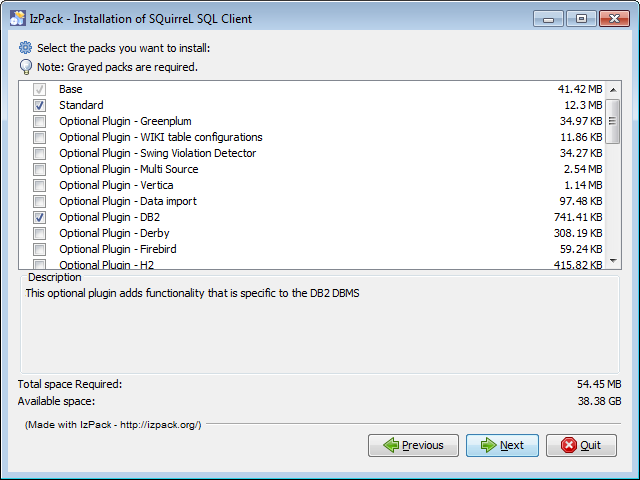


Everything else is just either next or picking the install directory

When you first open it you will get a screen like this


Click on the big “Drivers” button on the left hand side, and scroll down till you see “IBM DB2 App Driver” entry, you will see that like nearly all the other entries, it has a red X by it,


Now Double Click on the entry and in the pop up box, move to the “Extra Class Path” Tab


Next click on the “Add” button and go hunting for the driver Jar files, these are best to get of the DB2 server, they are:

db2jcc.jar

db2jcc_licence_cu.jar

and you will tend to find them in the directory

X:Program FilesIBMSQLLIBjava

where ever you have installed the db2 server

Once you have added them, change the “Class Name” drop down to

com.ibm.db2.jcc.DB2Driver


That’s you driver sorted, now make some connections

Click on the “Aliases” button then the “+” button to add a new Aliases


Select the driver you just setup, from the drop down field

Then in the URL field put the connection string for the database you want to get to in the format

jdbc:db2://XXX.XXX.XXX.XXX:50000/XXXX (port 50000 is the default port for db2)

for example

jdbc:db2://localdb2.ldc.com:50000/BLOGS

will get me the blogs database on my local server

for extra info here is the list of all the databases for the different connections Apps

Connections App: Files, DataBase: FILES

Connections App: Activities, DataBase: OPNACT

Connections App: Blogs, DataBase: BLOGS

Connections App: Communities, DataBase: SNCOMM

Connections App: Community Events, DataBase: SNCOMM

Connections App: BookMarks, DataBase: DOGEAR

Connections App: Forums, DataBase: FORUM

Connections App: HomePage , News, Search, DataBase: HOMEPAGE

Connections App: Metrics, DataBase: METRICS

Connections App: Mobile, DataBase: MOBILE

Connections App: Profiles, DataBase: PEOPLEDB

Connections App: Wiki, DataBase: WIKIS

Then just use enter the username and password (hint, you will NEVER get the lsuser account off your admin)

and click “OK”


You now have an alias that you can double click to connect to the specified database, you are going to have to create one for each of the Connections databases 🙁 , but you can make things easier by right clicking on a alias and copying it so you only have to make changes rather than start again.
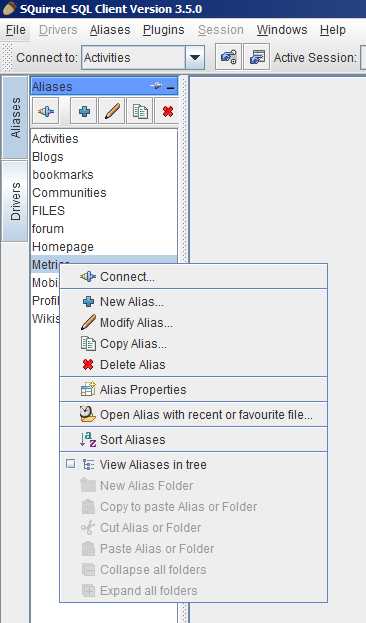


But it does seem a a pain to make everybody do this full setup, you can cheat even more by copying the SQLAliases23.xml file (it’s normally in a hidden directory in the users home drive but varies according to the operating system) and using it to replace the one on your target PC, all the aliases will then appear already setup.

Finally before this turns into a Squirrel sql manual, you can double click each of the aliases and not only see the database tree and gain access to the tables, but run SQL queries via the SQL tab at the top of the screen just under the normal menus.
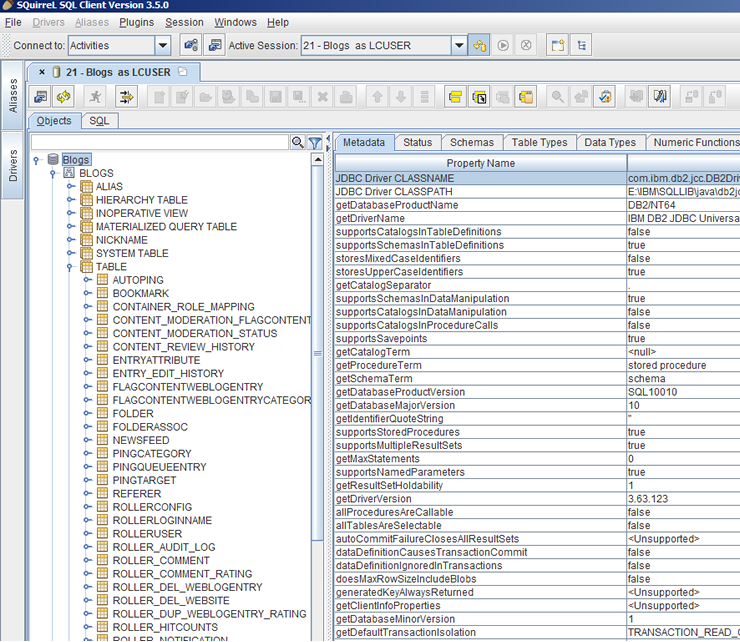


Have Fun!!

NOTE: I’m not a proper Connections / Web Sphere admin, If you want proper Web Sphere and Connections admin you want the Turtle Partnership