“Acid Sam” Run No. 8

Welcome to Episode 8, as I continue trying to get a really good “Acid Sam” time 1, An “Acid Sam” 2 is 100 Kettle bell Snatches followed immediately by a standard “Acid Bath” fitness test.

Progress and attempt times

For details of the test please see the bottom of this post

This week I set the hard goal of under 12mins, I managed 11:56, so I am very happy, this time I remembered to set up all the equipment correctly and that saved a good 10 seconds, but I think the big difference is that I set a final “reasonable goal” interval at the end as currently I know I wont get to 11mins, but now that I know I have the timings right it seems stupid to mess with them, so I just bolted a final interval on the end, and aimed for that

  1. 20 Snatches Off hand (0:58)
  2. 20 Snatches On hand (0:58)
  3. 15 Snatches Off hand (0:43)
  4. 15 Snatches On hand (0:43)
  5. 10 Snatches Off hand (0:29)
  6. 10 Snatches On hand (0:29)
  7. 5 Snatches Off hand (0:15)
  8. 5 Snatches On hand (0:15)
  9. Transfer Over to Acid Test (10 seconds using the Kettle Bell time, 10 seconds using the Acid bath time) (0:20)
  10. 500m Ski Erg (1:55)
  11. 500m Row (1:55)
  12. 1km Bike Erg (2:00)
  13. This weeks Goal time 12:00 (so final interval is 1:00)

Test Details

100 Kettle Bell snatches

Sam is prepping me so I can match the “Russian Kettlebell challenge certification Requirements” , so I use a session kettlebell of 24kg which is a basic standard for someone of my size 3

Time: between 5 – 10 mins, with under 5 mins without the Kettle bell touching the floor as the strict challenge (see details).

Details: The proper details of the challenge ( taken from) + the no set down rule:

Begin by getting into position, Hike-pass the kettlebell back and snatch it overhead in one movement, ending with a straight-arm lockout.
    • You may swing and change hands as much as needed
    • You may set the kettlebell down and rest as needed
Acceptable hand-coverings for the test include: tape, socks, Dragon Skins™, and minimalist gloves (i.e. cotton gardening gloves). You may use chalk and reapply it during the test, if needed. You may not use belts, thick or padded-gloves, wrist wraps or any other equipment designed to support your body.
No Count Criteria
    • Not locking out the elbows.
    • Rebending the knees on the way up.
    • Failure to stop all movement at the lockout.
    • Pressing out the kettlebell to finish your lockout.
    • Touching the chest with the working arm or passing through the rack position on the way down.
    • Placing a hand on the knee or thigh.
Failure (strict challenge)
Failure on the strict challenge will occur if:
    • You Touch the kettlebell with the non-working arm, unless you are switching hands.
    • You drop the kettlebell rather than setting it down with control (at the end).
    • You run out of time before completing the required number of reps.
    • You set down the kettlebell on the floor before the end.
Snatch Test Requirements:
For the snatch test, the sum of both arms is scored. There are different requirements based on gender and age group (Only the Open ones are listed here). They are as follows:

Men’s Open Class:

  • Up to 135 pounds     18kg 100reps / 5 min
  • 136-150 pounds       20kg 100reps / 5 min
  • 151-165 pounds       22kg 100reps / 5 min
  • 166-250 pounds       24kg 100reps / 5 min
  • Over 251 pounds     24kg 100reps / 5 min
  • Over 251 pounds (mad option) 28kg 100reps / 5 min

Women’s Open Class:

  • Up to 100 pounds     10kg 100reps / 5 min
  • 101-120 pounds       12kg 100reps / 5 min
  • 121-135 pounds       14kg 100reps / 5 min
  • 136-200 pounds       16kg 100reps / 5 min
  • Over 200 pounds      16g 100reps / 5 min
  • Over 200 pounds  (mad option) 18kg 100reps / 5 min

Acid bath

Details: The “Acid bath” is a standard fitness set which consists of the following:

For standards these all have to be done on the concept2 range of equipment.

Time: Men are supposed to do this under 6 minutes and Ladies under 7.

I monitor all of this with “Seconds Pro” as the best app to time it and here is the current set for you to use.

  1. , A Base goal of 11 minutes and a perfect goal of 10:30 seconds.[]
  2. Named after my fab PT Sam Bradley. []
  3. The weight you would take into a class.[]

Saleforce Same Code Different Triggers

In Salesforce the same bit of code can be triggered a lot of different ways and with calls to third parties there are different rules for the different ways of calling stuff.

For example take this bit of code, in it we are just passing a contact ID and it is going to go and talk to a third party web service, inside the “setUpRequest” it’s going to update the third party with the details of the Salesforce Contact and in return recive some bits and bobs from the third party to update the Saleforce side. Basic syncing between two parties

public class BlogFramework {
    public Static Void UpdateContactFromExternalWebService(String contactID) {
                Http h = new Http();
                HttpRequest request = setUpRequest(contactID);
                HttpResponse response = h.send(request);
    }           
}


we want this thing to happen at two different times:

1. When a user manually updates a contact and then just saves it: we want the sync to happen instantly so the user can see immediately what’s happened and what’s been updated.

2. On schedule: The content might not be updated in Salesforce at all, all changes might happen in the third party but the details still have to be kept up to date for reports and views etc.
So this bit of code has to be callable both from a Schedule and from a save Trigger

let’s take the save trigger first, as it is now it won’t work, you will get the error “Callout from triggers are currently not supported.” error if you try, normally you would just pop the annotation “@Future(callout=true)”1 at the top of this function and that would solve that but as you will see later on we can’t do that so what we’re going to do is have a little wrapper function that has the @future annotation and from that it’s going to call are real function.

@Future(callout=true)
public Static Void UpdateContactFromExternalWebServiceTrigger(String contactID) {
        BlogFramework.UpdateContactFromExternalWebService(contactID);
}   


we can then put that wrapper functions in our contact save trigger and everything will work perfectly

trigger ContactTriggerAllEvents on Contact (
    before insert,
    before update,
    //before delete,
    after insert,
    after update
    //after delete,
    //after undelete
    ) 
    {
        for(Contact cnt:Trigger.new)
        {
            BlogFramework.UpdateContactFromExternalWebServiceTrigger(cnt.ID); 
        }        
    }


Next comes calling it from a schedule, if we had put the @future annotation on the actual function this would fail because you cannot call a future function from a scheduled action but we dont have that issue now, what you DO have to do is bolt-on the “Database.AllowsCallouts” to your batch object as seen below

global class UpdateFromAzpiral implements Database.Batchable<sObject>, Database.AllowsCallouts{
    // Get all the contacts
    global Database.QueryLocator start(Database.BatchableContext BC){
        return Database.getQueryLocator([SELECT Id FROM Contact]);
    }
    // The executeBatch method is called for each chunk of objects returned from the start function.
    global void execute(Database.BatchableContext BC, List<Contact> scope){
      for(Contact c : scope){
         BlogFramework.UpdateContactFromExternalWebService(c.ID);
      } 
    }
    //The finish method is called at the end of a sharing recalculation.
    global void finish(Database.BatchableContext BC){
    }
}


Now your batch object will be allowed to do callouts.
Putting all these bits together means you can have a single function that calls out to third parties that can be triggered from either a Schedule or an ordinary Trigger.

  1. The “@Future(callout=true)” annotation basically means that the salesforce code does not stop and wait before doing other things this means that calls to third parties does not slow down the salesforce UI.[]

Unlimited Test Email Addresses

A silly tip that has saved me tons of hours and make clients happy is having an Email domain that has “catch-all” routing on it.

Basically this is having a domain that any address that you use with it automatically routes to a central email address, mine is the “energywins.co.uk” domain, anything you send to that domain ends up at my main address, be it “clientTest1@energywins.co.uk” or “fakeUser200@energywins.co.uk”, this did not used to be that useful when all apps were internal, but in the world of cloud apps and PARTICULARLY with the Salesforce/Pardot world that only allows an email to be registered once it is invaluable and helps you to keep clients separated (they also love to have you use emails address that are specific to them ie “MicrosoftTEST@energywins.co.uk”

This can be done easily with just about any email provider, but I use Gmail for domains as it is easy, fast and cheap1.

Strangely the Gmail for Domain instructions keep changing, are oddly poor for Google and the setting is buried REALLY deep which I assume means they don’t really want you to do it. so if things change, just search for “Gmail Catch All” in the meantime:

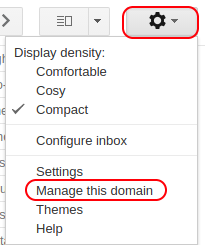
  • From your inbox, Click on the little cog on the right-hand side and select “Manage this Domain”

  • Then select “Apps”

  • Then select “G Suite”

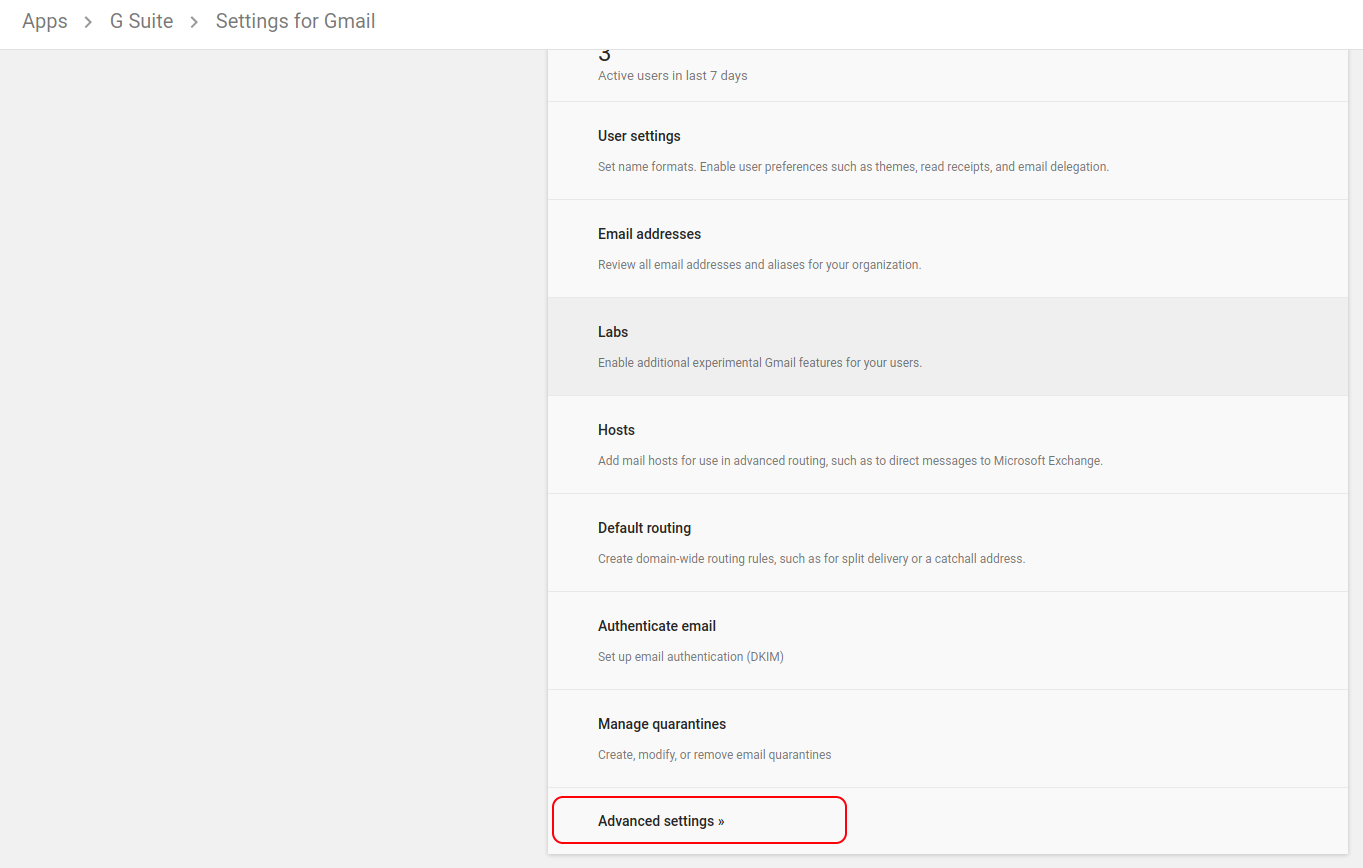
  • Then select “Gmail”

  • Then scroll down to the bottom and select “Advanced Settings”

  • Then scroll nearly down to the bottom and under “Routing” you will see the setting for “Email routing”, change the radio button for “Unknown mailbox account messages” to “Route to catch-all address”, and put in your main email address for this domain.

That’s it, for most people this is not a suitable setting because it just slightly increases your spam content, but for me and anyone who needs a constant stream of individual email address and to not lose track of old ones used one 6 months ago, it’s invaluable.

  1. Some of my colleges use temp email domains such as http://www.throwawaymail.com but I have found that such things have a habit of being needed again in 6 months when the client comes back for more work.[]